Understanding your audience is the foundation of every effective marketing strategy. Yet as customer data grows more complex and scattered across channels, manually sorting through it becomes impossible. That is where customer segmentation tools and come in — purpose-built platforms that help you divide your audience into actionable groups and deliver the right message at the right time.
This guide breaks down what customer segmentation is, the benefits of using dedicated tools, the types of segmentation and platforms available, and key features to look for when choosing the best customer segmentation tools for your business. You will also find a curated list of top customer segmentation tools compared side by side.
What is customer segmentation?
Customer segmentation is the practice of dividing your customers into distinct groups based on shared characteristics — demographics, behavior, location, purchase history, or preferences. The goal is straightforward: understand who your customers are so you can communicate with each group in a way that resonates.
Instead of blasting the same message to your entire database, segmentation lets you tailor offers, content, and timing to each group’s specific needs. The result is higher engagement, stronger retention, and measurable revenue growth.
But defining segments on paper is one thing. Executing segmentation at scale — across millions of users and multiple channels — requires the right technology. That is why businesses turn to dedicated customer segmentation tools to automate and operationalize what would otherwise be a manual, error-prone process.
What are customer segmentation tools and software?
Customer segmentation tools (also called customer segmentation software) are platforms designed to collect, integrate, and analyze customer data — then automatically group customers into distinct, actionable segments.
In simple terms, the purpose of segmentation tools is to turn raw data into targetable audiences you can act on immediately.
Here is what they do:
- Collect data from multiple sources: app events, website visits, purchase history, CRM records, and third-party integrations.
- Analyze and categorize that data using rules, machine learning, or both — identifying patterns you would miss manually.
- Create segments you can immediately activate in campaigns: push notifications, emails, in-app messages, SMS, and more.
Whether you call it customer segmentation tools or customer segmentation software, the core function is the same: making your audience data actionable.
Benefits of using customer segmentation tools
Knowing why segmentation matters is useful. Knowing what happens when you use the right tools for customer segmentation is what changes your numbers. Here are the tangible benefits:
- Enhanced personalization and customer experience
Segmentation tools let you tailor messaging, offers, and content to each group’s preferences and behavior. Customers receive communication that feels relevant — not generic. - Improved marketing campaign effectiveness and ROI
When every campaign targets a defined segment, open rates, click-through rates, and conversions improve. Segmentation tools for marketing eliminate the waste of one-size-fits-all blasts. - Increased customer retention and loyalty
By identifying at-risk users early (through behavioral signals or RFM scores), you can trigger re-engagement campaigns before customers churn. Pushwoosh, for example, combines behavioral tracking with automated journey builders to act on these signals in real time — making it an effective customer retention software. - Optimized resource allocation and reduced costs
Stop spending budget on audiences unlikely to convert. Tools help you focus on high-value segments where your spend has real business impact. - Deeper customer insights and analytics
Customer segmentation analytics tools reveal patterns across demographics, behavior, and purchase history — informing not just marketing but product and business decisions. - Revenue growth and higher CLV
Targeted upsell, cross-sell, and retention campaigns drive revenue more efficiently. Companies using advanced segmentation consistently report higher customer lifetime value.
📚 Related: RFM segmentation guide: identify your most valuable customers
Types of customer segmentation tools and platforms (by functionality)
Not all segmentation tools work the same way. Types of customer segmentation tools can be grouped by their primary function:
Customer relationship management (CRM) systems
CRM for segmentation focuses on managing customer interactions and storing relationship data — contact details, communication history, deal stages, and support tickets. CRM customer segmentation tools like HubSpot and Salesforce (customer segmentation tools HubSpot being a popular choice) let you segment by lifecycle stage, deal value, or engagement history. Best suited for sales-driven segmentation in B2B contexts.
Customer data platforms (CDPs)
A CDP for segmentation unifies customer data from every source — app, web, email, CRM, support — into a single customer profile. Platforms like Segment and mParticle excel at creating a 360-degree customer view, making them ideal for advanced, cross-channel segmentation. They often integrate with execution tools for campaign delivery.
Marketing automation platforms
Marketing automation segmentation tools combine segmentation with campaign execution. They let you build segments and immediately activate them in automated workflows — emails, push sequences, SMS, and more. Pushwoosh’s Customer Journey Builder is a strong example: segment and message from a single canvas.
Analytics and business intelligence tools
Analytics segmentation tools like Amplitude and Mixpanel focus on understanding user behavior through funnels, cohorts, and trend analysis. They help you identify segments but typically require integration with an engagement platform to act on them.
Mobile engagement and push notification platforms
This is where Pushwoosh fits. Mobile engagement platforms leverage real-time behavioral data for hyper-targeted push notifications (iOS, Android, web), in-app messages, email, and SMS. Pushwoosh combines behavioral customer segmentation tools (tags, events, RFM) with push notification services and a visual journey builder — making it a complete solution for teams that need to segment and communicate in one platform.
Key features to look for in customer segmentation tools
When evaluating customer segmentation tools features, here is what separates adequate platforms from great ones:
- Flexible data integration — The tool should connect to your existing stack: CDPs, analytics platforms, CRMs, data warehouses, and app SDKs. Pushwoosh integrates with Segment, mParticle, Amplitude, Mixpanel, and more.
- Behavioral tracking and event-based segmentation — Beyond static attributes, look for tools that track real-time events (purchases, screen views, feature usage) and let you build segments on those actions. This is the foundation of customer data segmentation tools.
- RFM analysis — Built-in Recency, Frequency, Monetary scoring identifies your most valuable customers and those at risk of churn — without manual calculation.
- Segmentation logic (AND/OR operators) — Combine multiple conditions to create precise segments. Pushwoosh’s proprietary Segmentation Language supports unlimited combinations.
- Customer journey automation — Segments are only useful if you can act on them. Look for a visual journey builder that lets you trigger messages based on segment entry, exits, and behavioral events.
- Dynamic content personalization — Personalize message content per segment using tags, liquid templates, and conditional logic.
- A/B/n testing — Test multiple message variants per segment to optimize performance. Not just A/B — multivariate (A/B/n) testing accelerates learning.
- Cross-channel delivery — The best tools support push notifications, in-app messages, email, SMS, and WhatsApp from one platform.
- Reachability check — Verify which channels a user is reachable on before sending. Prevents wasted impressions and improves deliverability.
- Real-time analytics dashboards — Monitor segment performance, campaign results, and engagement trends. Pushwoosh offers fully customizable dashboards on every plan.
- AI-powered optimization — AI campaign creation and send-time optimization help you reach each segment when they are most likely to engage.
- Data privacy and compliance — ISO 27001, GDPR, OWASP compliance should be non-negotiable.
- Scalability and pricing transparency — The tool should grow with your business. Check whether advanced features are locked behind enterprise tiers. Customer segmentation tools price varies widely — from free tiers to $100K+/year.
The best customer segmentation tools and platforms
Here is a list of customer segmentation tools that cover different use cases, business sizes, and budgets. We have compared each tool across the features that matter most. Below you will find detailed customer segmentation tools examples to help you evaluate the right fit.
Pushwoosh: built to reach any customer segment at the right time
Best for: Mobile-first teams that need behavioral segmentation and omnichannel messaging in one platform — from startups to enterprises. A strong option among the best B2B customer segmentation tools as well as B2C, thanks to its flexible segmentation engine and affordable pricing.
Pushwoosh is a customer engagement platform purpose-built for mobile and web engagement. It combines powerful customer segmentation tools with cross-channel messaging (push notifications, in-app, email, SMS) and a visual Customer Journey Builder — all from a single interface. Whether you are looking for best customer segmentation tools 2023 upgrades or evaluating platforms for 2026, Pushwoosh delivers the capabilities modern teams need.
Custom data integration options
Before segmenting your data, upload it to Pushwoosh in a CSV file or use one of our 3rd party integrations. Stream your data from one of the following CDP and data streaming platforms: Twilio Segment, mParticle, Zapier, Solitics or Make.
You could also push the information from product analytics tools such as Amplitude, Mixpanel, and Google Analytics or marketing analytics platforms like Adjust and AppsFlyer.
Contact Pushwoosh Team to learn more about available data integration options.
Tag-based and event-based segmentation
With Pushwoosh, you can create customer segments based on tags. To jumpstart your segmentation, you can use Pushwoosh’s default tags, such as the user’s app version, browser, city, language, OS version, and more. Check out the complete list of pre-built tags on our documentation website.
You can also segment users based on events they performed within your application. For instance, you could send contextual messages to users who showed their interest in specific app sections using our default events. You keep users engaged by delivering spot-on content, promotions, and interactions.
💡Check out the audience segmentation tactics HungryNaki used to achieve a tenfold surge in DAU, a 2.6-fold growth in MAU, and a boost in monetary metrics.
RFM segmentation
RFM (recency, frequency, monetary) analysis and segmentation are available to Pushwoosh users. A built-in RFM analysis tool shows you how different customers interact with your application. With this information, you can reach out to at-risk-of-churn customers to ensure that they stick to your solution or target high-value customers with a repeat purchase offer.
Advanced segmentation flexibility
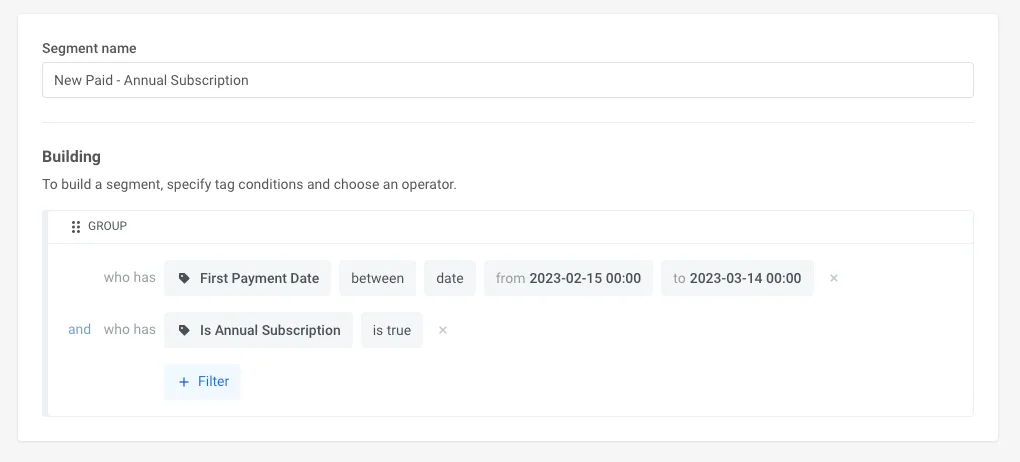
Segment based on multiple criteria Source: Pushwoosh platform
With its proprietary Segmentation Language under the hood, Pushwoosh allows you to build any segment based on your requirements.
For example, you can create a campaign by combining several segments.
Let’s say you own an e-commerce store and want to sell more sun protection hats because you’ve just signed a contract with a clothing brand that sews stylish, high-end hats. You need to segment and target those users who showed interest in buying items for their next summer holiday so that you can also offer them sun protection hats.
In Pushwoosh, you can easily target these users as one segment:
Bought a bathing suit in the last 14 days
AND
Viewed sunglasses for at least $100 in the last 30 days
What other conditions can you set to build custom segments? Check out the complete list of logical operators we support in segmentation.
A/B/n testing capabilities
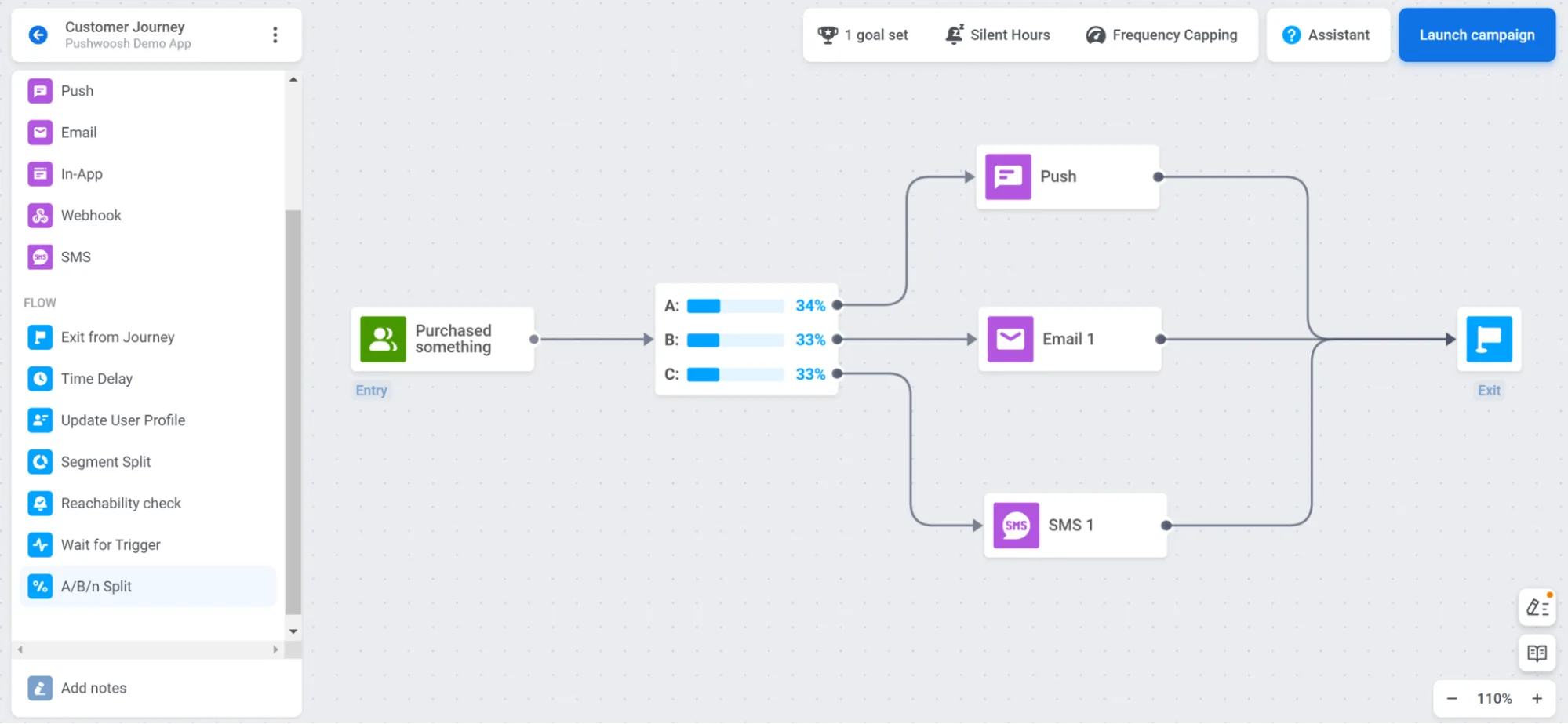
Compare two or multiple variations of messages to determine which one gets the highest response from the audience and works best for your conversion goals. Testing multiple variables simultaneously streamlines optimization processes, allowing teams to identify the most effective communication combinations. Watch our YouTube video to find out how you can use A/B/n testing to send engaging messages to your customers.
Personalization
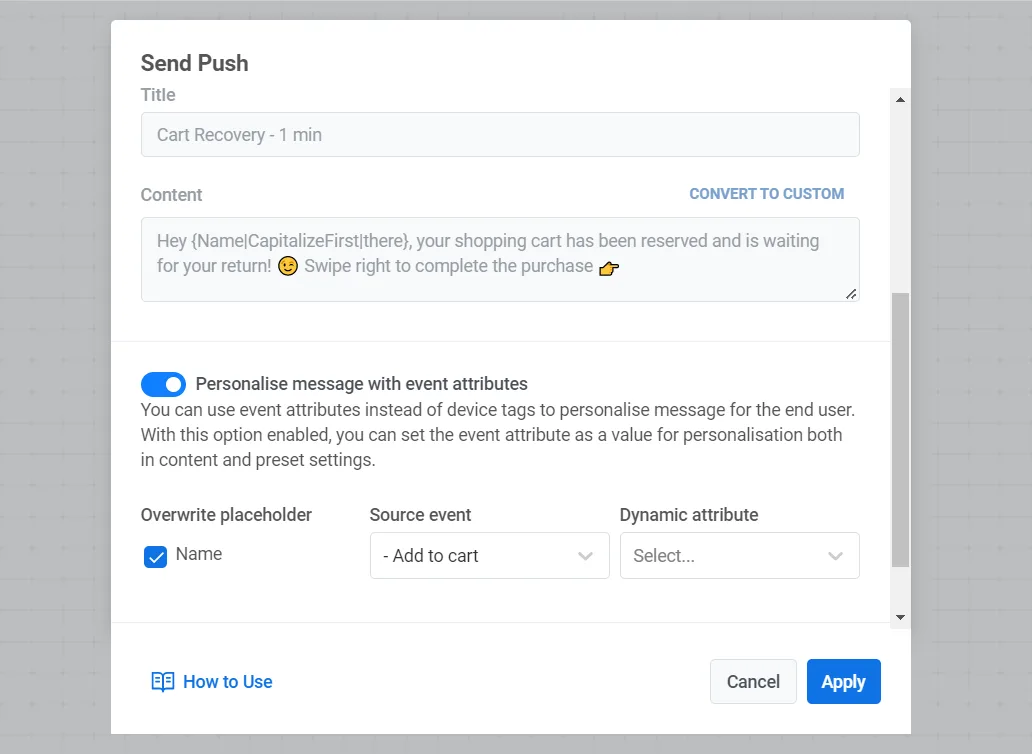
Message personalization Source: Pushwoosh platform
Personalized communication is about strategically tailoring messages to a user’s unique context, preferences, and behaviors. With Pushwoosh, you can leverage available customer data to create contextually personalized communication flows on two levels.
At the campaign level, in our Customer Journey Builder, you can create dynamic segments based on users’ characteristics and actions. This way, you can divide users by the target action they took (or didn’t take) and send them different messages.
On the content-creation level, utilize custom and pre-built tags, events, and liquid templates to write conversational messages. For instance, mention the level a game player has achieved, the exact product a customer has viewed, or talk to them in a language they prefer.
Reachability check
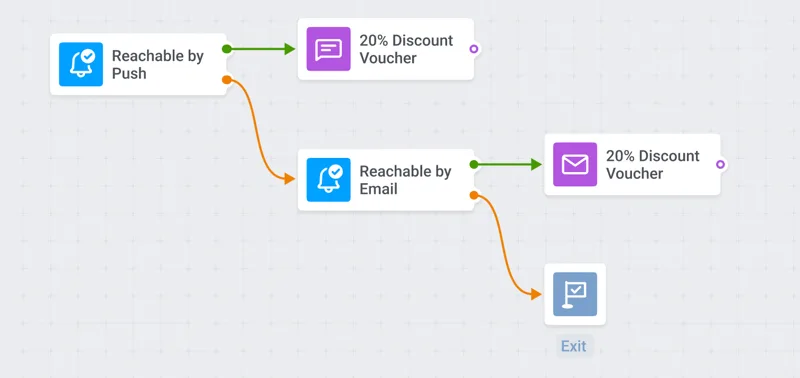
Reachability check Source: Pushwoosh platform
Implement user-centric communication strategies with Pushwoosh’s reachability check feature. For example, if users are unreachable via email, you can always opt to send an in-app message instead.
Reachability check drives engagement as it helps deliver messages through the most effective channels, maximizing the likelihood of interaction and response from the target customer segment.
Built-in data privacy and compliance
Pushwoosh emphasizes data security, ensuring your customer data remains safe and compliant with privacy regulations.
Reaching out to your target audience securely is essential because it builds trust, complies with regulations, mitigates data breaching risks, and maintains confidentiality and your reputation.
Here’s what we do to make sure your customer’s data is secure:
ISO 27001 certified
Our data centers’ infrastructure, operation, and customer support are entirely in line with the standard.
GDPR compliant
Pushwoosh guarantees its compliance with the European General Data Protection Regulation.
Adhering to OWASP
We follow the recognized development principles that make our software secure by design.
Data retention period
With Pushwoosh, active user device data is stored without limits. Event and message history are kept for 1 year, with extensions available. This surpasses the capabilities of other platforms, enabling advanced behavioral segmentation.
Actionable reporting dashboards
Pushwoosh offers a flexible and user-friendly dashboard builder. With this builder, you can create customized dashboards tailored to your business’s needs. These dashboards can be configured to display your business’s most important data, including information about events, message metrics, audience insights, and more.
With your selected metrics available at a glance, you can monitor your app and messaging performance, make informed decisions, and optimize your customer segmentation strategies effectively. Check out our latest statistics dashboards release announcement.
Ease of use
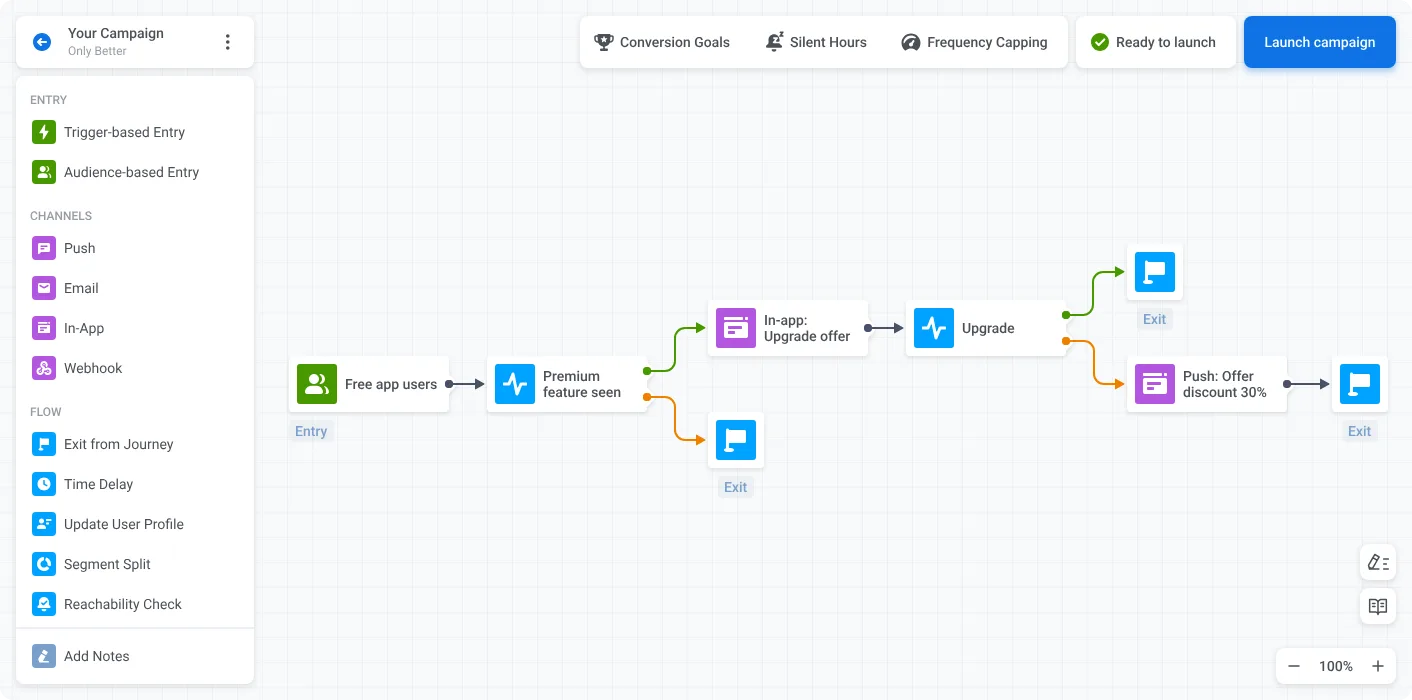
Customer Journey Builder interface Source: Pushwoosh platform
Registration with Pushwoosh is simple: after signing up, you can access all the tool’s features. You won’t need to agree to sales demo presentations before trying the tool, although, of course, you can always contact our experienced team to discuss your specific needs and business cases.
Pushwoosh is highly regarded for its easy-to-use interface, which allows non-technical teams, especially marketers, to use it easily. Our Customer Journey Builder is designed to create a clear visual representation of your customer segments. Default events and tags are available for building segments on the same canvas as messaging sequences, which is convenient because you can set up an entire campaign within one screen.
Pushwoosh customers have praised our customer success & support teams on G2, Capterra, and in private. Little wonder: our engineers are available 24/7 to respond to any question you may have, including any segmentation-related challenge.
Pricing
Our pricing starts at $0, which is budget-friendly for startups and SMBs — making Pushwoosh one of the best free customer segmentation tools and a strong option for customer segmentation tools for small business. As you’ll see from our competitive analysis below, we offer better price-value than any other customer engagement tool available on the market. Teams exploring customer segmentation software free options can start with our free tier and scale as they grow.
Braze
Braze is a comprehensive customer engagement platform that serves large and corporate customers. While the platform has robust customer segmentation features, it’s worth noting that it comes with a higher price tag and requires some time to master.
| Pushwoosh | Braze | |
|---|---|---|
| Custom data integration options | ✔️ | ✔️ |
| Out-of-the-box data segmentation functionality | ✔️ + RFM segmentation | ✔️ |
| Custom customer segmentation | ✔️ | ✔️ |
| A/B/n testing | ✔️ | ✔️ |
| Personalization | ✔️ | |
| Reachability check | ✔️ | ✔️ |
| Built-in data privacy and compliance | ISO 27001, GDPR, OWASP | SOC 2, GDPR, HIPAA, and CCPA |
| Data retention period | 1 year for event data | 90 days |
| Actionable reporting dashboards | ✔️ | ✔️ Takes time to master |
| Ease of use | ✔️ | Takes time to master |
| Pricing | Starts at $49/month | $60k–100k/year or $5k–8.3k/month |
🔎Want to see how Pushwoosh compares to Braze on other features? Check out our complete comparison list.
Custom data integration options
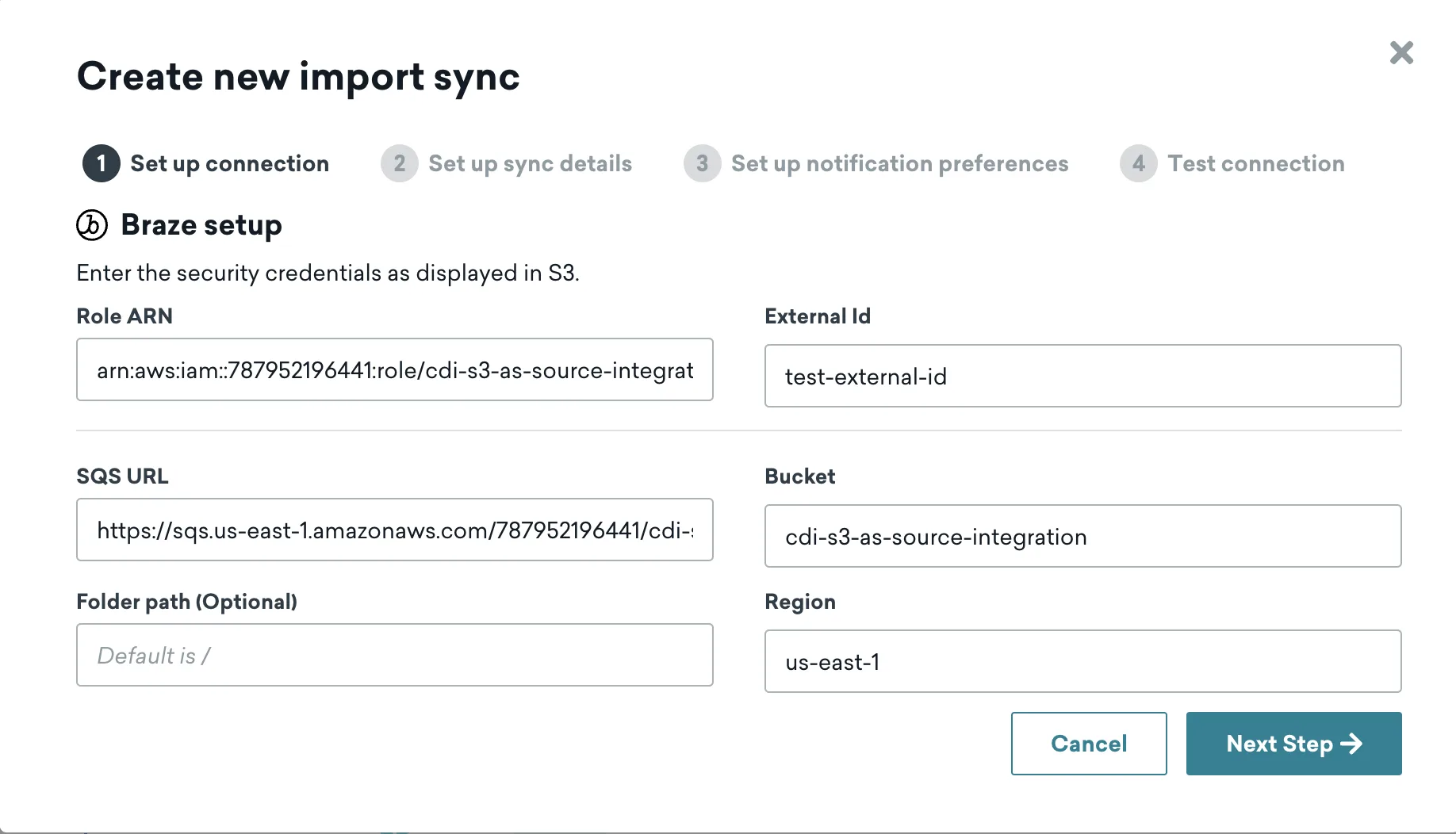
Create new data import sync Source: Braze documentation website
Braze offers Cloud Data Ingestion (CDI), where you set up an integration between your data warehouse instance and Braze workspace to sync data regularly. You could configure data integrations from Amazon Redshift, Databricks, Google BigQuery, Snowflake, and Amazon S3. Similarly to Pushwoosh, Braze’s team has done a good job of ensuring you have many options for pushing data to their platform.
Out-of-the-box data segmentation functionality
Regarding user attributes and behavioral data, Braze allows to collect and process a sufficient amount of data. You can use categories to target users based on 131 predefined attributes.
At the same time, according to the information on the company’s documentation website, RFM segmentation isn’t available with Braze, while Pushwoosh offers this segmentation type out of the box.
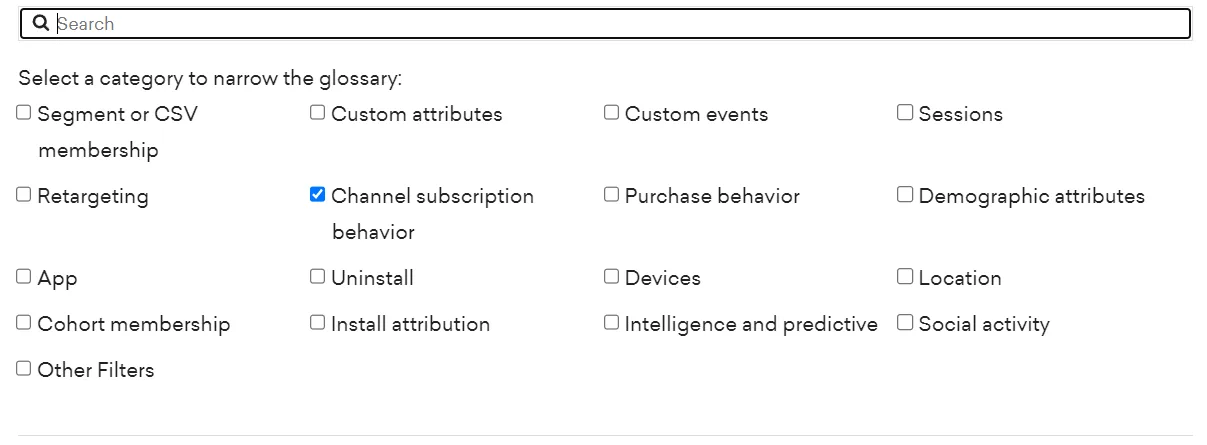
Data segmentation options Source: Braze documentation website
Advanced customer segmentation flexibility
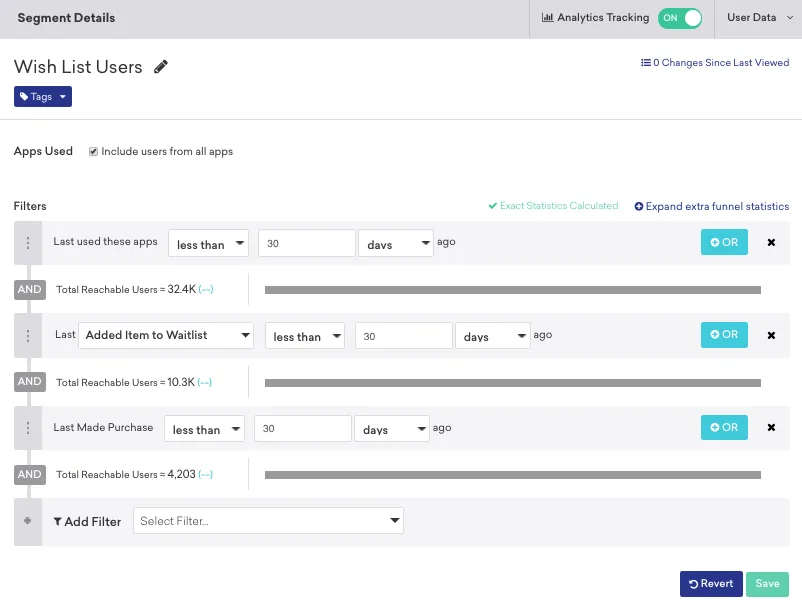
Building customer segments Source: Braze documentation website
You can segment your audience by importing any custom attributes. The platform supports boolean, number, string, array, time, objects, and arrays of object attributes.
Just like with Pushwoosh, you can combine as many filters as you need to make your segmentation as specific as you like, allowing you to run precisely segmented marketing campaigns.
A/B/n testing capabilities
Braze supports multivariate testing, which is essential for identifying the messaging that sparks action. This feature is also available with Pushwoosh at a fraction of the cost.
Personalization
Liquid templates, custom tags and events, and conditional messaging logic are available on Braze to foster personalization. Pushwoosh provides comparable functionality at a significantly lower cost.
Reachability check
Similarly to Pushwoosh, the platform is geared to perform reachability checks and channel eligibility validation before sending messages to users.
Built-in data privacy and compliance
Braze takes customer data privacy and security seriously. The platform is built in line with standards and regulations set by SOC 2, GDPR, HIPAA, and CCPA.
Data retention period
According to the company’s internal rules, Braze can keep customer data for up to 90 days. In contrast, Pushwoosh offers unlimited storage for device data and retains event and message history for 1 year, with options to extend the retention period.
A more extended data retention period lets you launch creative retargeting and remarketing campaigns in the future and analyze the segment’s behavior over time.
Actionable reporting dashboards
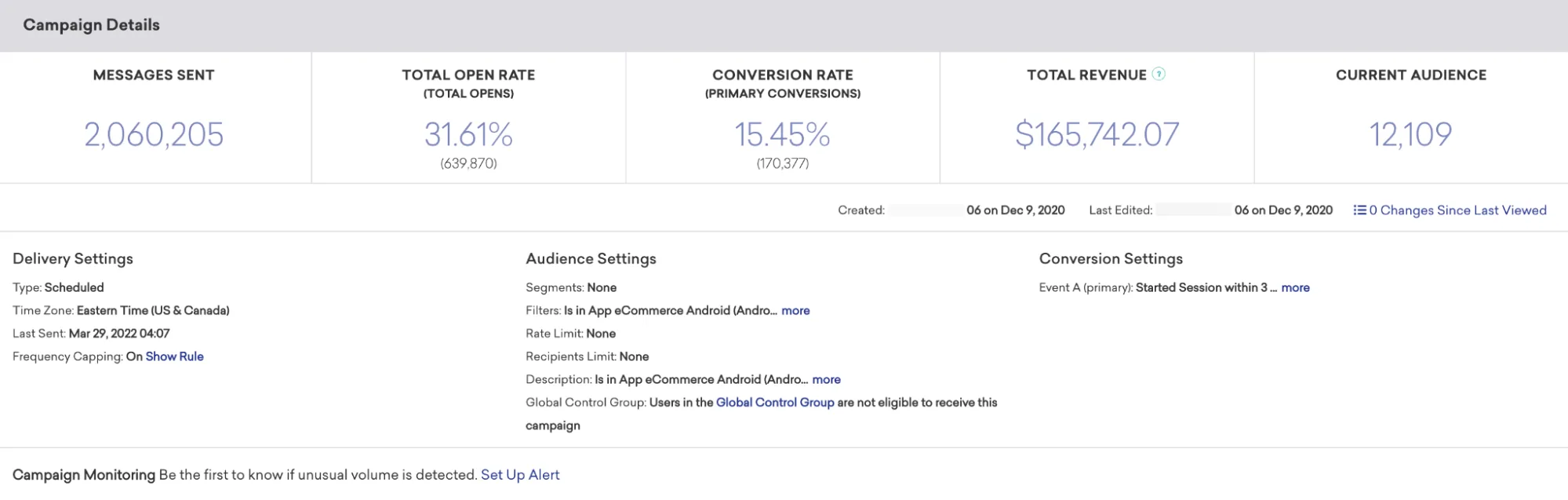
An example of reporting at a campaign level Source: Braze documentation website
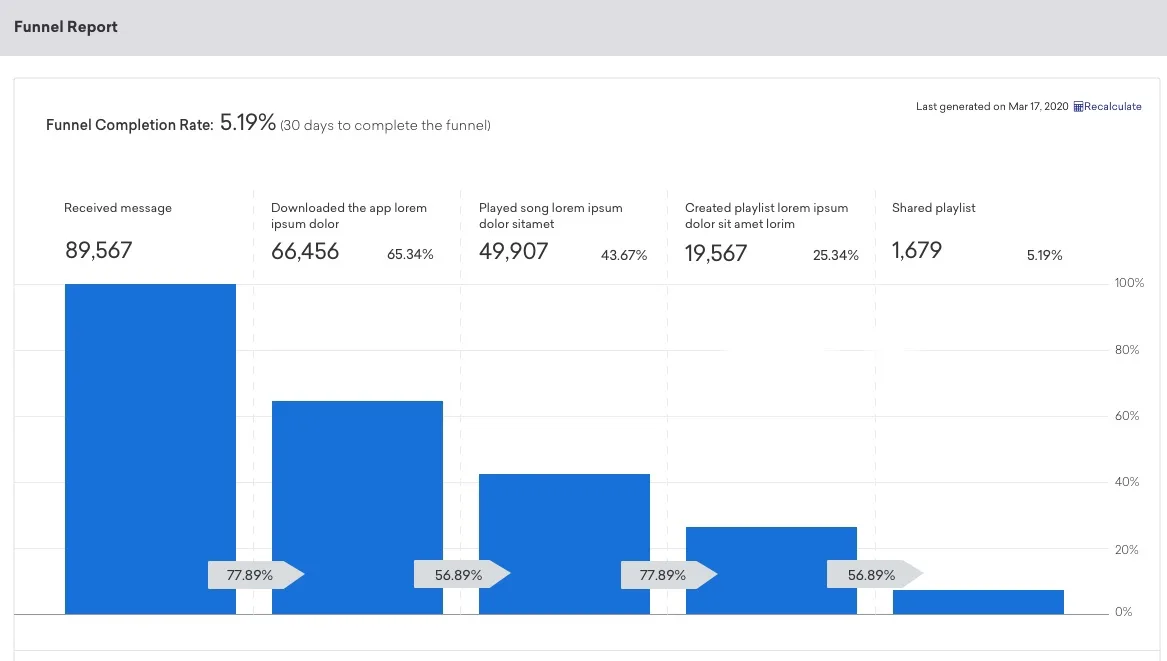
Reporting on a canvas level Source: Braze documentation website
Braze offers extensive reporting dashboards on campaign and canvas levels, facilitating decision-making for crafting future campaigns.
Still, some G2 users needed help creating reporting dashboards with custom tags. They’ve also noticed reporting discrepancies for custom events, which means they could not rely on the provided data.
Users also reported a long learning curve for the software’s reporting functionality.
Ease of use
The registration process is time-consuming; you must fill out two lengthy forms to connect with the sales team. User reviews on G2 and Capterra reported a long learning curve in mastering Braze.
Customers on G2 and Capterra praise Braze’s support team for always being happy to help with any issue.
Pricing
Braze doesn’t publicly display its pricing, yet the reported average service cost ranges from $60k to $100k annually.
Pushwoosh, on the other hand, provides pricing models suitable for businesses of all sizes.
CleverTap
CleverTap is a customer engagement and retention platform that targets large and medium-sized companies. They offer good customer segmentation features; however, usability can be a stumbling block. Customers have reported that sometimes they couldn’t resolve issues on their own because of poorly written documentation.
| Pushwoosh | CleverTap | |
|---|---|---|
| Custom data integration options | ✔️ | ✔️ |
| Out-of-the-box data segmentation functionality | ✔️ | ✔️ |
| Custom customer segmentation | ✔️ | ✔️ |
| A/B/n testing | ✔️ | A/B/C testing |
| Personalization | ✔️ | ✔️ Only available to users on Advanced and Cutting Edge plans |
| Reachability check | ✔️ | ✔️ |
| Built-in data privacy and compliance | ISO 27001, GDPR, OWASP | GDPR, CCPA, SOC 2 Type II, ISO 27001, and HIPAA |
| Data retention period | 1 year for event data | 3+ years |
| Actionable reporting dashboards | ✔️ | ✔️ |
| Ease of use | ✔️ | ✔️ |
| Pricing | Starts at $49/month | Starts at $75/month |
🔎See how Pushwoosh compares to CleverTap on other features.
Custom data integration options
With CleverTap, you can inject user data from CMSs, mobile apps, and CRMs. Like Pushwoosh, the platform offers integrations with Mixpanel, Amplitude, mPartice, and Segment.
Out-of-the-box data segmentation functionality
CleverTap lets you target users based on previous behavior and specific attributes such as their device type or subscription tier. The platform also allows users who haven’t launched the app in the last 30 days to be targeted.
Similarly to Pushwoosh, RFM segments are available out of the box with CleverTap.
Advanced customer segmentation flexibility
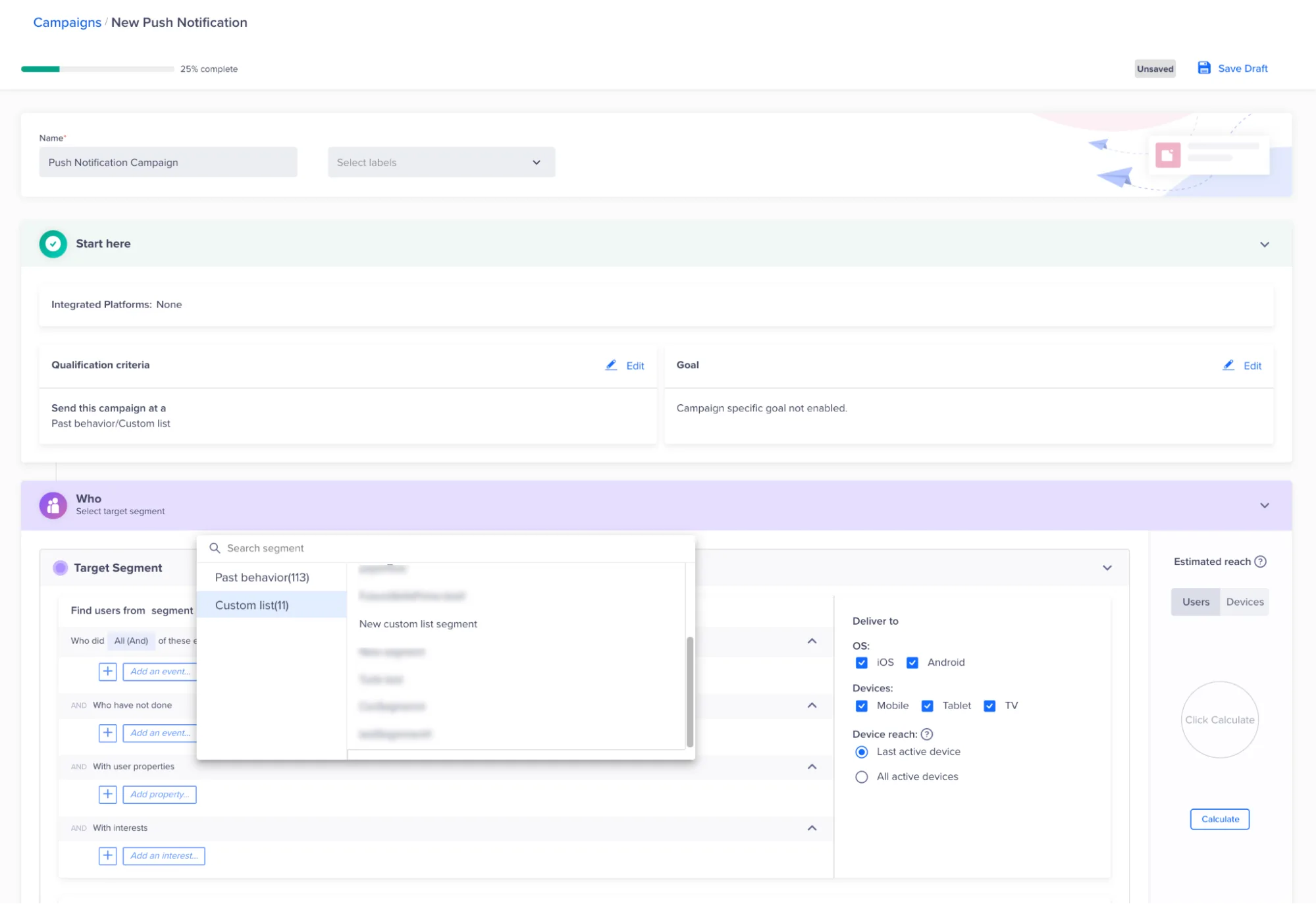
Segment creation Source: CleverTap documentation website
With CleverTap, you can create custom events and lists to target your users based on the attributes specific to your business. Like Pushwoosh, CleverTap grants its users full control over the type of data they wish to store and for how long.
A/B/n testing
CleverTap users can conduct A/B/C testing to identify which of the three messaging variants melts their audience’s heart.
With Pushwoosh, you can run unlimited A/B/n testing to find the message that hits the spot.
Personalization
CleverTap offers personalization features similar to those we’ve built at Pushwoosh. You could personalize messages with tags, events, and dynamic content blocks. However, all personalization features are available only on higher-tier plans.
Reachability check
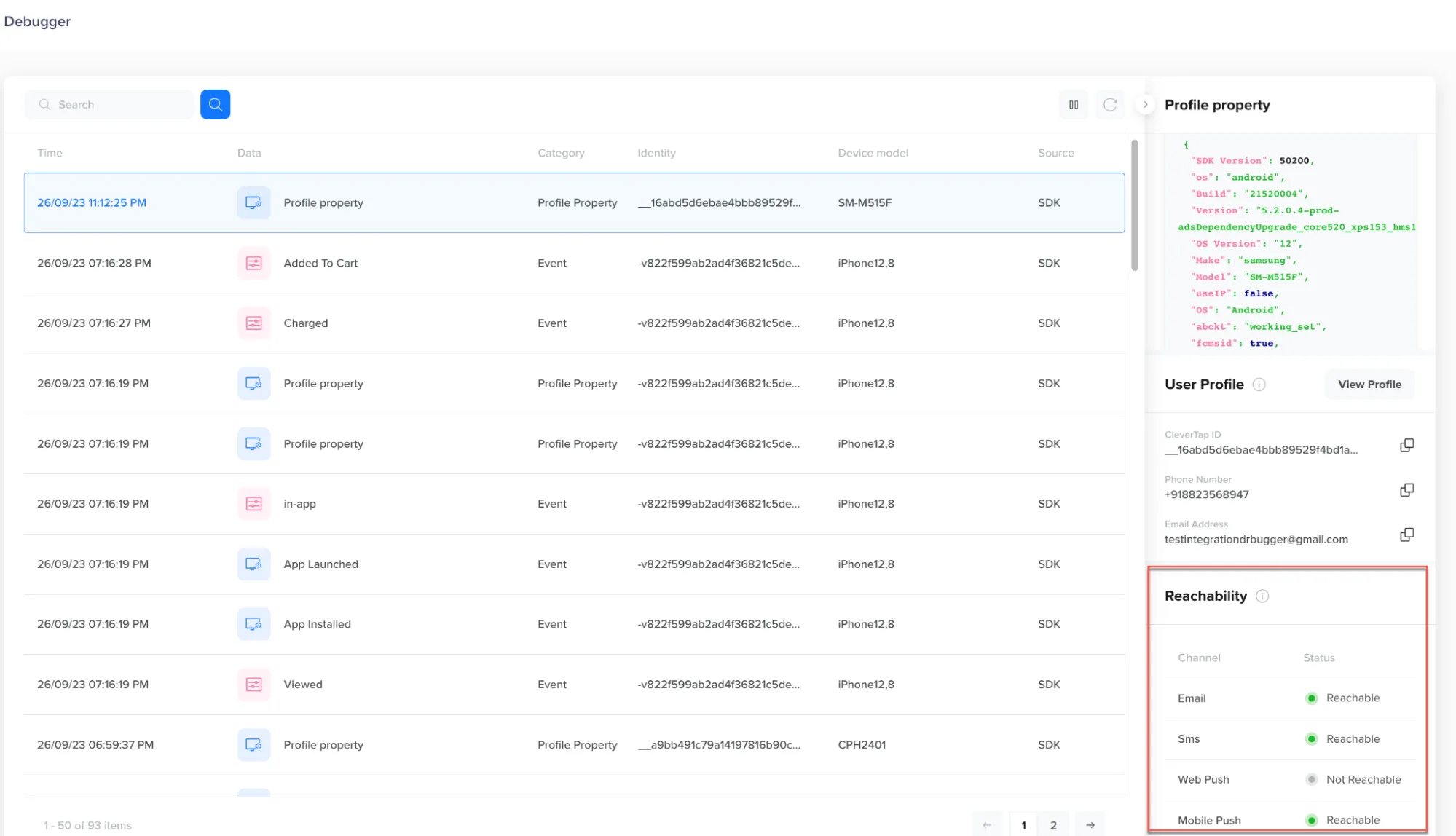
Reachability check Source: CleverTap documentation website
Like on the Pushwoosh platform, the reachability verification feature is available on CleverTap, and you can check whether your users are reachable via mobile push notifications, email, SMS or web push notifications.
Built-in data privacy and compliance
CleverTap complies with GDPR, CCPA, SOC 2 Type II, ISO 27001, and HIPAA.
The company stores all data on localized AWS instances and follows best practices to ensure data is protected.
At Pushwoosh, on the other hand, we run on privately owned enterprise-grade server hardware and only store our customers’ data in Pushwoosh Enterprise Cloud. Our infrastructure ensures continuous availability and highest-level performance.
Data retention period
For customers on Essentials and Advanced plans, CleverTap stores data for three years. The default data retention policy for the upper Cutting Edge plan is ten years. CleverTap deletes all backups within 60 days of the customer deleting their data from the platform.
Valuable reporting dashboards
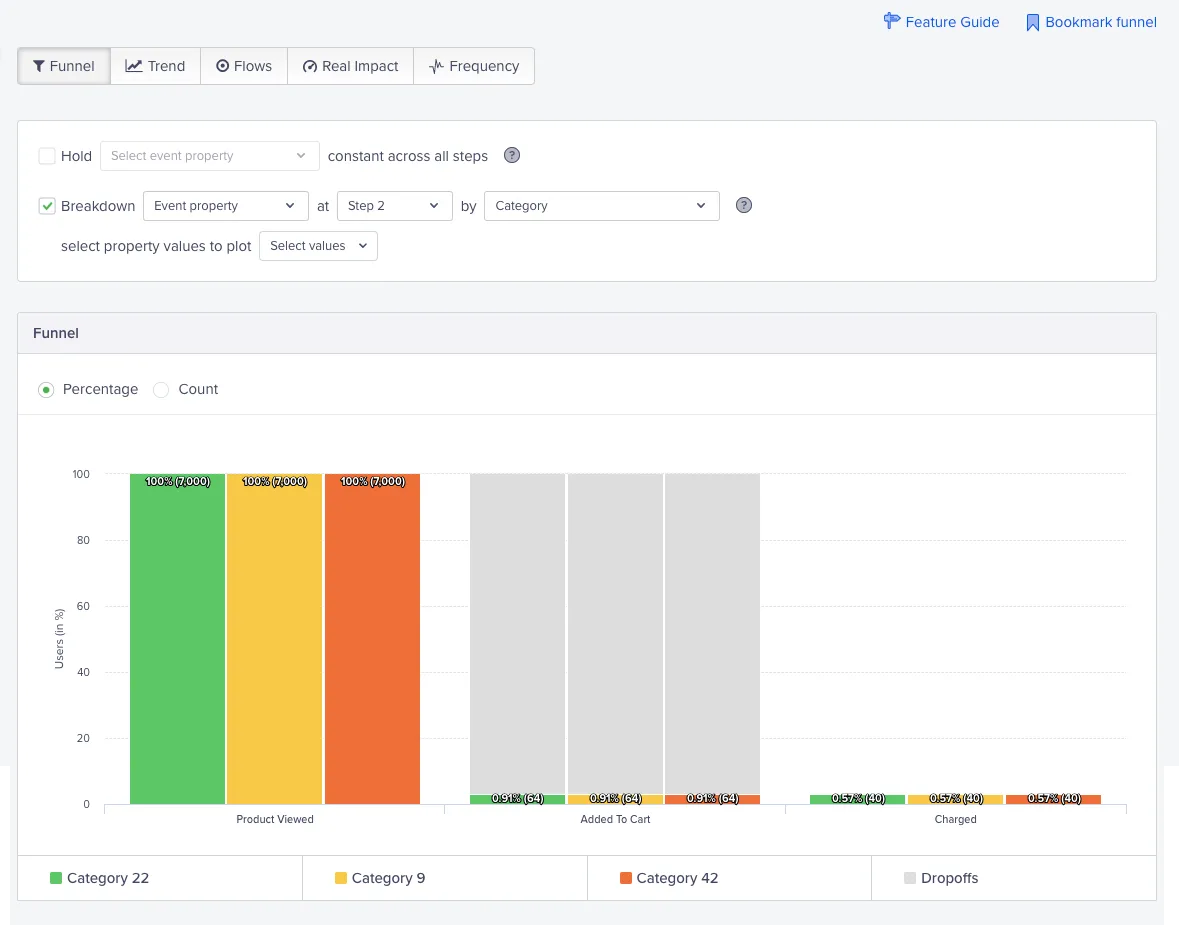
Funnel analytics Source: CleverTap documentation website
CleverTap offers extensive reporting dashboards, allowing you to analyze user behavior in funnels, cohorts, pivots, trends, and flows.
In addition, CleverTap has introduced its generative AI solution, Clever.AI, to equip customers with AI recommendations for user engagement and retention analytics.
The complete analytics toolset seems diverse, but reviewers on G2 and Capterra have noticed inconsistencies in conversion goal calculation, which can lead teams to wrong conclusions about their campaigns’ performance.
Ease of use
CleverTap’s website doesn’t allow users to sign up and try the platform. However, on G2, you can find a shortened demo of the platform that leads to a ‘Request a demo’ form. You’ll need to contact the team before using the product.
CleverTap’s UI/UX is intuitive. The only exception is their drag-and-drop in-app messaging editor, which is a bit rigid and requires time to get accustomed to.
60+ Capterra and G2 users mentioned their favorable experiences with CleverTap’s support team. The team was praised for its responsiveness and product and tech knowledge.
Pricing
CleverTap’s pricing starts at $75/month. However, the Essentials plan does not offer many valuable message personalization and segmentation features.
Pushwoosh, on the other hand, provides all segmentation and personalization features starting at $49/month.
MoEngage
MoEngage is a powerful customer engagement platform for large, corporate-sized companies. If you’re a startup or a medium-sized company, for $999/month, you won’t have access to tech integrations, advanced customer segmentation, and customizable reporting dashboards, which are crucial for targeting relevant customer segments.
| Pushwoosh | MoEngage | |
|---|---|---|
| Custom data integration options | ✔️ | ✔️ Only available for customers on Growth and Enterprise plans (over $999/month) |
| Out-of-the-box data segmentation functionality | ✔️ | ✔️ RFM segments are available for customers on Growth and Enterprise plans |
| Custom customer segmentation | ✔️ | ✔️ Only available for customers on Growth and Enterprise plans |
| A/B/n testing | ✔️ | ✔️ Only available for customers on Growth and Enterprise plans |
| Personalization | ✔️ | ✔️ Only available for customers on Growth and Enterprise plans |
| Reachability check | ✔️ | ✔️ Only available for customers on Growth and Enterprise plans |
| Built-in data privacy and compliance | ISO 27001, GDPR, OWASP | GDPA, CCPA and HIPAA, PIMS ISO 27701:2019, 2022, BCMS ISO 22301:2019, SOC 2 Type 2 attestation from AICPA, and SCA Star Level 2 |
| Data retention period | 1 year for event data | Up to 180 days |
| Actionable reporting dashboards | ✔️ | ✔️ Custom dashboards are available only on Growth and Enterprise plans |
| Ease of use | ✔️ | ✔️ |
| Pricing | Starts at $49/month | Starts at $999/month |
🔎Check out the complete comparison list: Pushwoosh vs MoEngage.
Custom data integration options
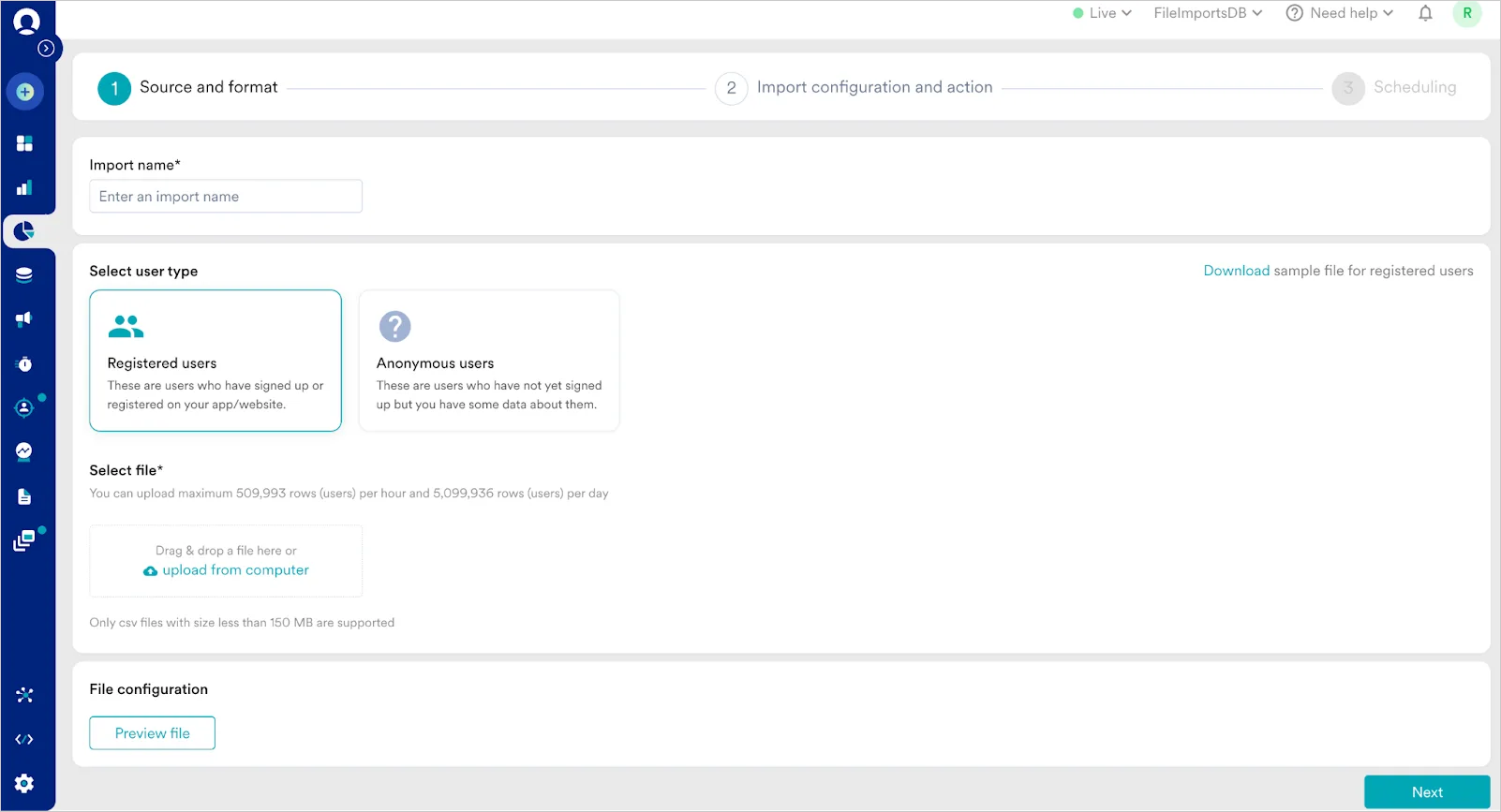
Data integration Source: MoEngage documentation website
You can integrate your data from a CSV file or connect your data warehouse with MoEngage. If you use Snowflake, Microsoft Azure Blob storage, Amazon Redshift, or Google Big Query, you can use the integrations built by MoEngage. You can also push the information from your data analytics tools, such as PostHog, Heap, Google Tag Manager, SnowPlow, Amplitude, or Mixpanel, to Moengage.
These platform integration options should be sufficient for building targeted campaigns. However, they’re only available to users on Growth and Enterprise plans; if you choose the Starter plan, you can only export customer segments.
In contrast, at Pushwoosh, data integrations are available on any plan you choose.
Out-of-the-box data segmentation functionality
MoEngage lets you segment users based on their attributes, behavior, and offline interactions with your business.
You can also build RFM and affinity segments with the tool; however, these segmentation types are only available for customers on Growth and Enterprise plans.
For comparison, Pushwoosh offers RFM segments, helping you target at-risk users at only $49/month.
Custom customer segmentation
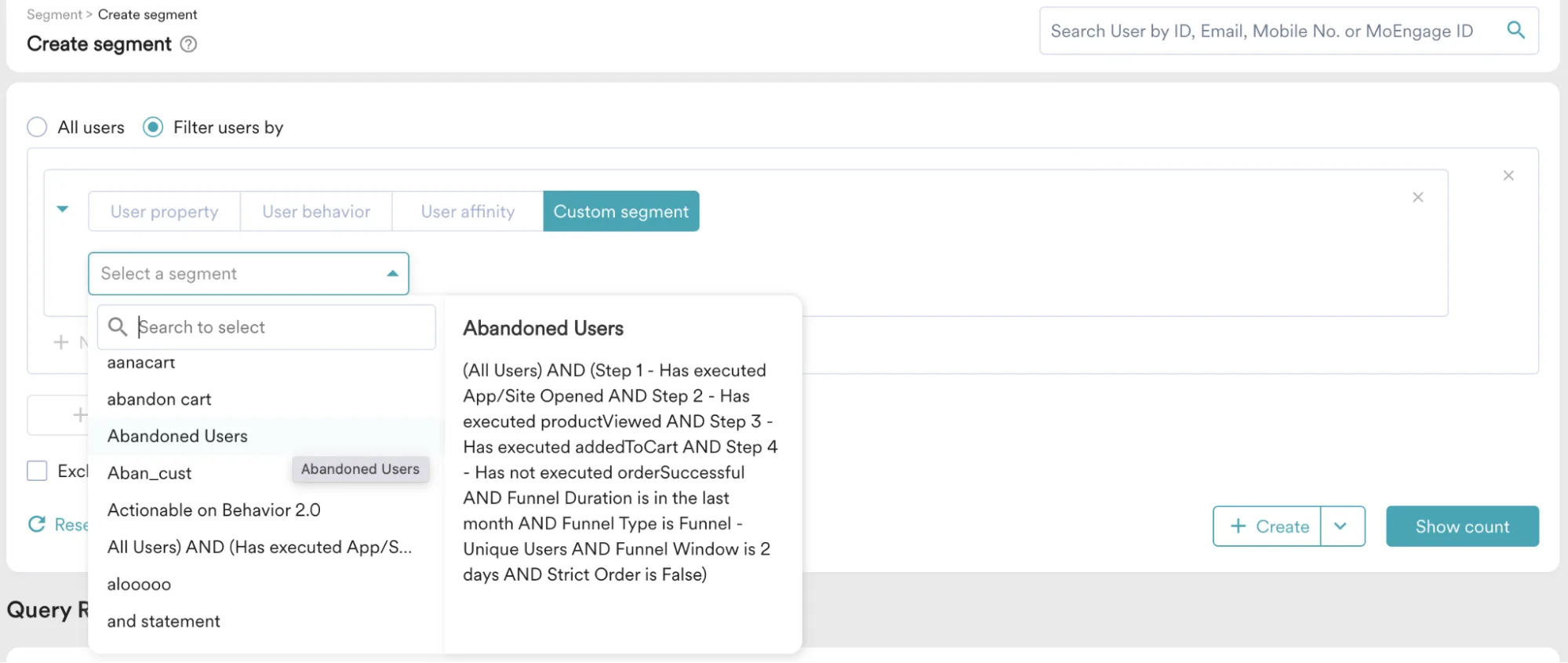
Segment creation Source: MoEngage documentation website
MoEngage allows you to build and combine multiple segments into one and easily use them in workflows. Custom segments can be composed of any combination of previously-built segments and customer attributes.
However, custom segments are only available on Growth and Enterprise plans, making them inaccessible to emerging businesses.
A/B/n testing capabilities
MoEngage offers A/B/n testing functionality, essential for businesses optimizing customer engagement through segmentation and data-backed experiments. As you’ve probably already guessed, this functionality is available for customers on Growth and Enterprise plans.
Personalization
Like Pushwoosh, MoEngage lets you personalize omnichannel campaigns based on users’ data and behavior. However, with the Starter plan, you can only personalize messages based on user attributes. The Growth plan lets you personalize messages based on attributes, events, and APIs. Only the Enterprise plan comes with all of MoEngage’s personalization features. You can also personalize web pages with these high-tier plans.
Reachability check
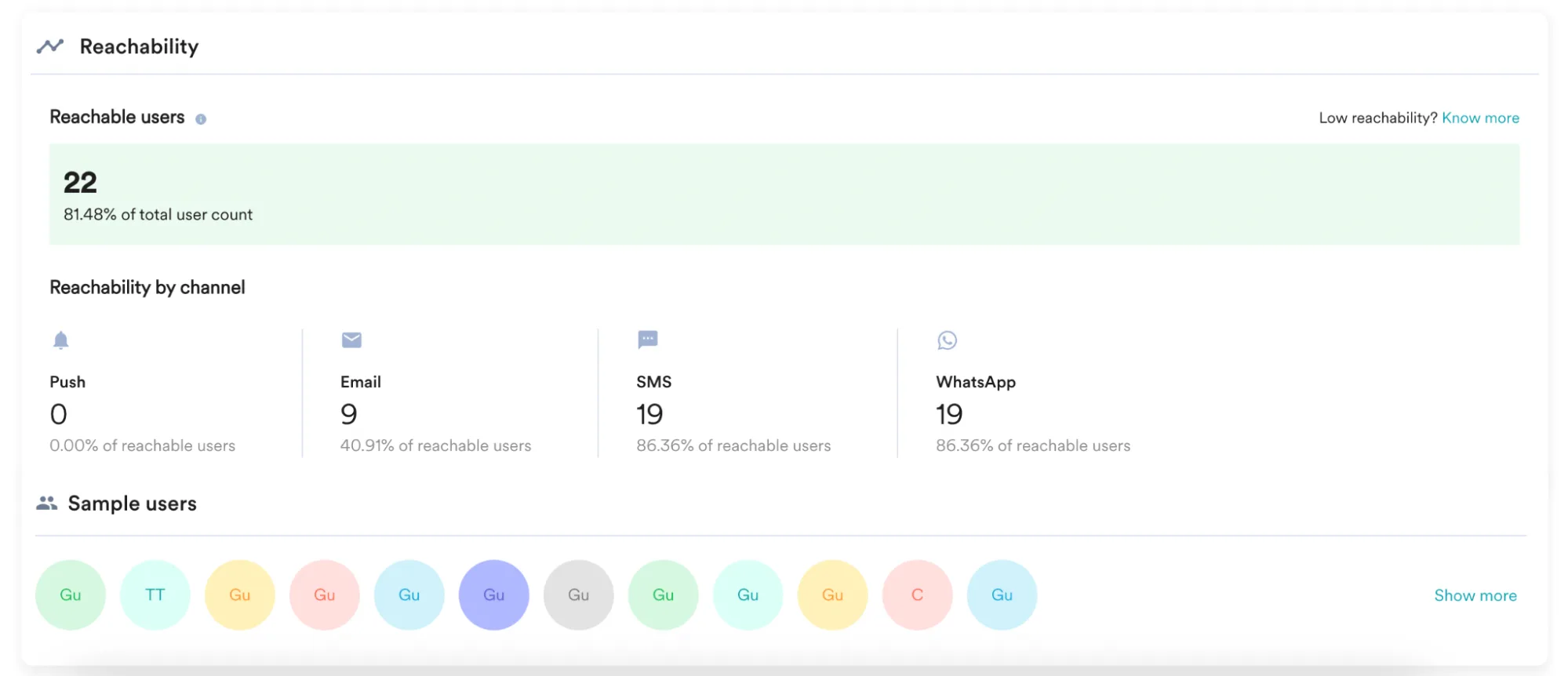
Reachability check Source: MoEngage documentation website
Knowing how many of your customers can be reached on the channel of your choice is vital for any communication campaign, and MoEngage knows it. Reachability checks are available to the customers—you guessed it—on higher-tier plans.
Built-in data privacy and compliance
The platform is GDPA, CCPA, and HIPAA compliant. MoEngage also has several security certifications, such as PIMS ISO 27701:2019, 2022 and BCMS ISO 22301:2019; SOC 2 Type 2 attestation from AICPA; and SCA Star Level 2. Pushwoosh, at the same time, runs on enterprise-grade server hardware. Our infrastructure is built in a way that ensures continuous availability and highest-level performance.
Data retention period
As for data storage, MoEngage only allows event criteria to be set for periods under 180 days. This restriction can pose challenges when targeting users who have been inactive for an extended period.
In comparison, Pushwoosh retains event history for 1 year, with the option to extend.
Actionable reporting dashboards
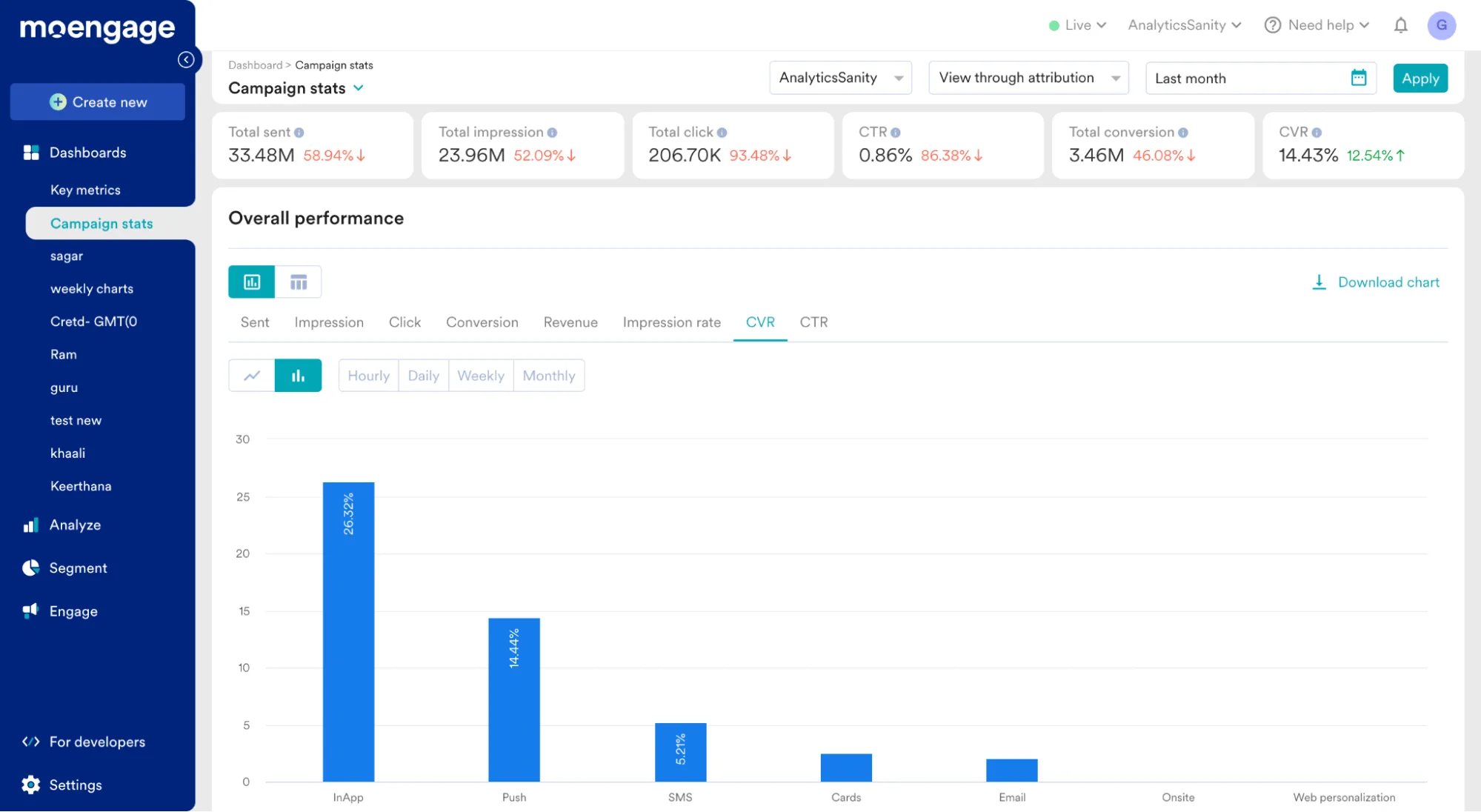
‘Key metrics’ and ‘Campaign stats’ are the default reporting dashboards you access with the Starter plan. These dashboards cannot be modified.
On more expensive plans, you get access to custom reporting dashboards that can be adjusted to see how your segmented campaigns performed.
Pushwoosh lets any user build personalized reporting dashboards on any subscription plan.
Ease of use
You’ll need to schedule a demo session with MoEngage’s team before trying customer segmentation functionality, which is inconvenient if you like exploring things on your own first.
Over 140 users of G2 and Capterra users have praised MoEngage’s usability. This is important because you don’t want to waste valuable time learning how to use yet another tool.
Capterra and G2 reviewers mentioned having a great experience with the customer support team. Overall, the reviews mention teams’ responsiveness and knowledgeability, but be aware that a representative will be there to help you only on the Growth and Enterprise plans. With the Starter plan, you can access the online self-help guides and email customer support.
That said, you can always schedule a call if you need a consultation from Pushwoosh’s customer success team at a fraction of the cost.
Pricing
Customers say that the starting pricing is $999 per month, which is pricey for medium-sized companies.
OneSignal
OneSignal is a good fit for small and medium-sized companies looking into customer engagement tools. However, when it comes to customer segmentation, OneSignal lacks RFM and past-behavior-based segmentation. You cannot check user reachability with OneSignal.
Ultimately, multivariate tests and advanced segmentation are only available to customers on Professional ($999/month) and Enterprise plans.
| Pushwoosh | OneSignal | |
|---|---|---|
| Custom data integration options | ✔️ | ✔️ |
| Out-of-the-box data segmentation functionality | ✔️ | ✔️ No RFM Segmentation and past-behavior-based segments. You can create a limited number of segments |
| Custom customer segmentation | ✔️ | ✔️ It has limitations based on the number and segment types |
| A/B/n testing | ✔️ | ✔️ Only available to users on Professional and Enterprise plans |
| Personalization | ✔️ | ✔️ Is limited based on the plan |
| Reachability check | ✔️ | ❌ |
| Built-in data privacy and compliance | ISO 27001, GDPR, OWASP | GDPR, SOC 2 Type 2, and HIPAA compliant |
| Data retention period | 1 year for event data | Lifetime |
| Actionable reporting dashboards | ✔️ | ✔️ Dashboards are not customizable |
| Ease of use | ✔️ | ✔️ |
| Pricing | Starts at $49/month | Starts at $9/month, but the most valuable features for customer segmentation and engagement are available at $999+ |
🔎Check out how Pushwoosh compares to OneSignal in terms of other features.
Custom data integration options
You can upload your customers’ data from a CSV file to OneSignal or use one of their tech integrations. They have native integrations with Snowflake data warehouse, RudderStack, Google Cloud Platform, Twilio Segment, and more. If you want to integrate your analytics tool, you can set up data streaming from Google Analytics, Shopify, Mixpanel, Amplitude, and Microsoft Center Analytics.
With OneSignal, just like with Pushwoosh, you’re equipped with the tech stack to build carefully considered customer segments.
Out-of-the-box data segmentation functionality
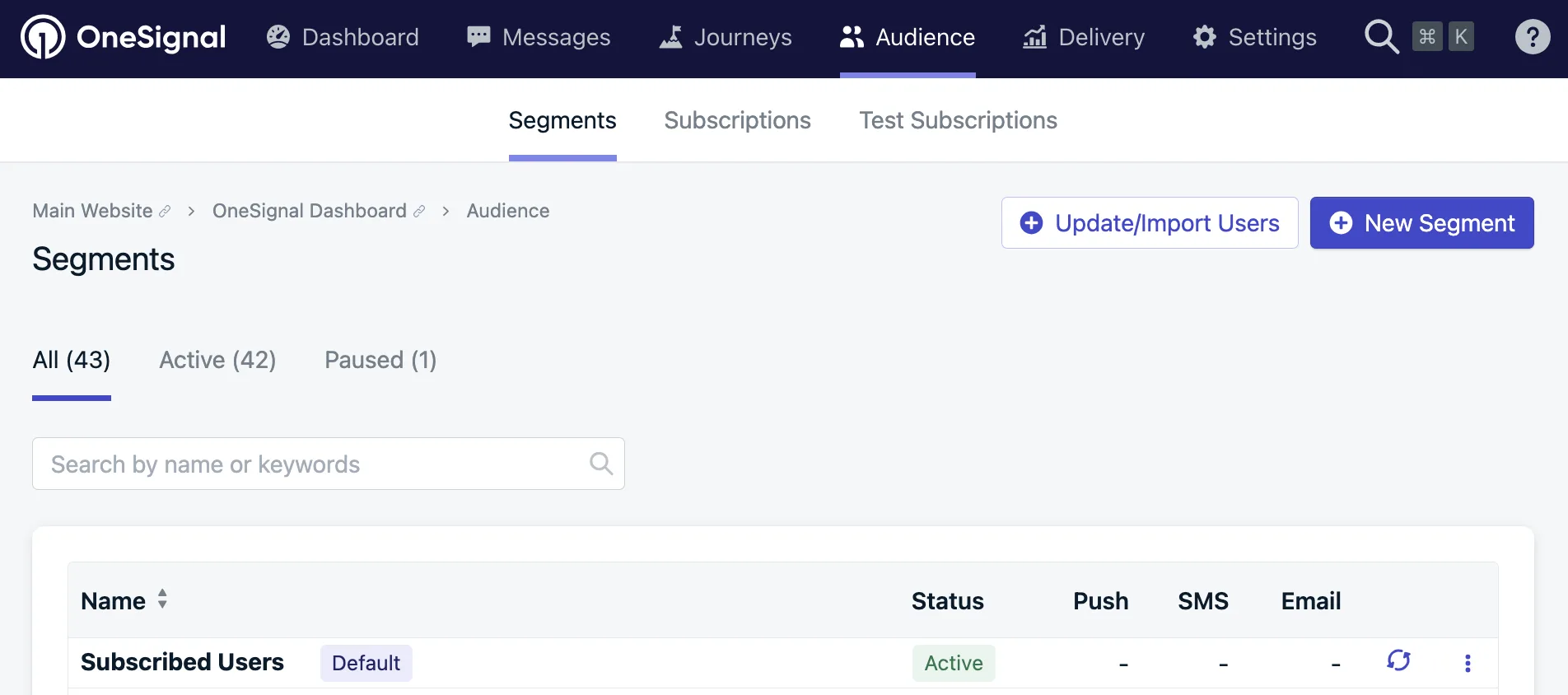
Segments view Source: OneSignal documentation website
With OneSignal, you can target users based on multiple data filters, such as activity, country, language, and time zone.
The tool doesn’t let you segment customers based on RFM, so you might miss an opportunity to re-activate your at-risk clients or upgrade/upsell those with high monetization potential.
OneSignal doesn’t let you target users based on past behavior, which is inconvenient if you want to plan a campaign targeted at users who bought a particular product in the past, for example.
Another restriction is the limited number of segments you may build, depending on your subscription. On the $9/month plan, you can only create ten segments; for $999/month, you can create no more than 20.
Pushwoosh, on the other hand, doesn’t limit the number of segments you can create on the platform. Build as many as you need to experiment, refine your targeting, and reach your goals.
Custom customer segmentation
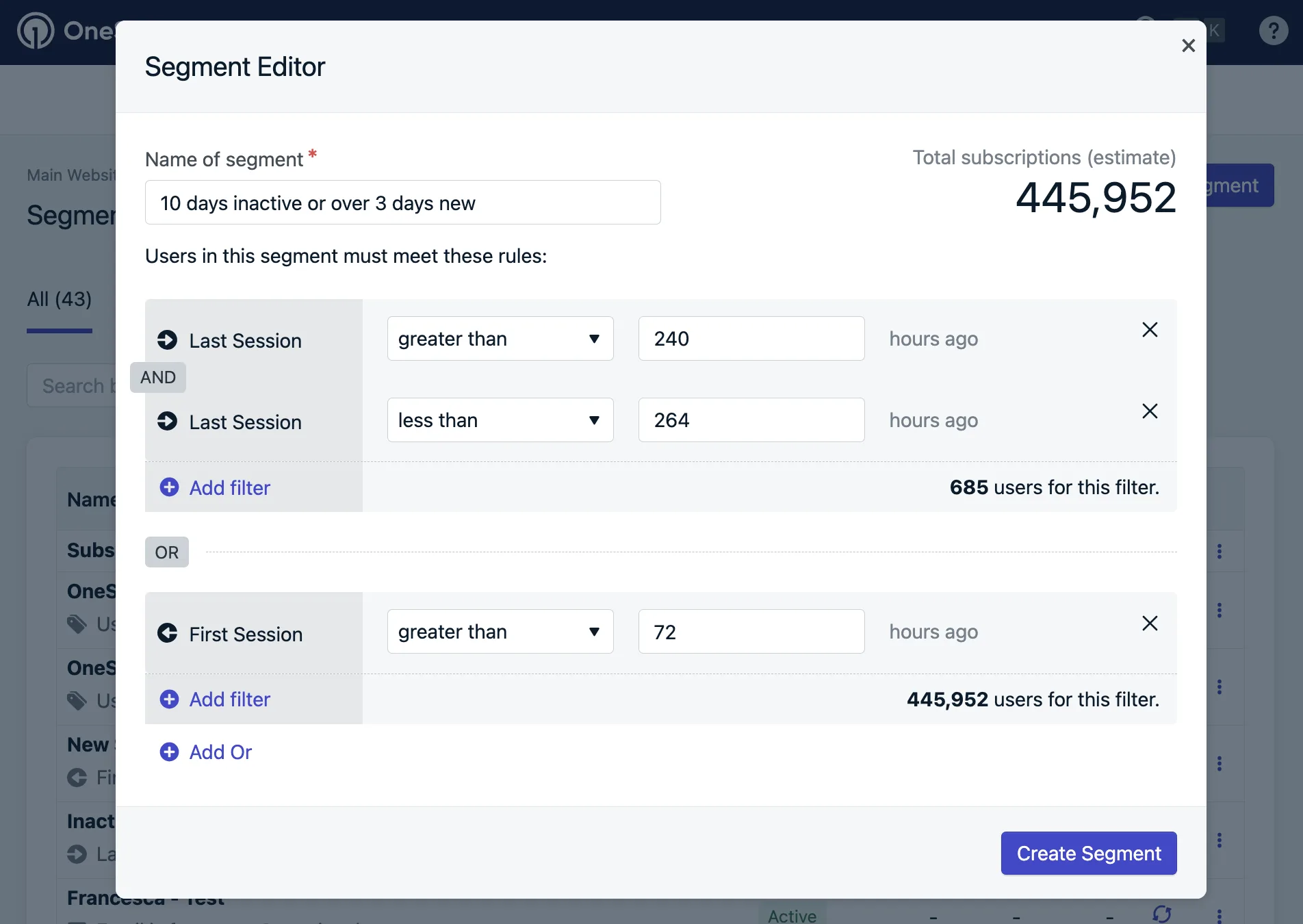
Customer segment editor Source: OneSignal documentation website
Custom customer segments are available to OneSignal customers but in a limited capacity. Companies on the $9/month plan can create ten custom data tags and build ten customer segments. Those on the $999/month plan can create 100 data tags and 20 audience segments.
Unfortunately, with OneSignal, you can’t create segments with any combination of filters (connected by the logic operators “or/and”). With Pushwoosh, you can build any customer segment you can imagine.
A/B/n testing capabilities
Multivariate tests are available to OneSignal users on the Professional and Enterprise plans. If you’re on the Growth plan, you’ll only have A/B tests. Simple A/B tests are not sufficient for testing variables other than messaging. For comparison, multivariate testing is available to all Pushwoosh users, regardless of their subscription tier.
Personalization
According to the company’s website, personalization based on tags, events, and variables is available but has limitations.
The free plan allows you to personalize your messaging with two tags.
The professional and growth plans let you use ten and 100 tags, respectively.
The enterprise plan enables you to use an unlimited number of tags.
Pushwoosh, on the other hand, lets you craft personalized communications campaigns with as many variables as you need.
Reachability check
Based on the information available online, OneSignal doesn’t have a reachability check feature, which is disappointing because if your user group cannot be reached, it doesn’t justify sending the campaign in the first place.
Built-in data privacy and compliance
The tool is GDPR, SOC 2 Type 2, and HIPAA compliant, which makes it a reliable partner in terms of your users’ data protection.
Data retention period
According to the company’s documentation website, all user data and messages sent through OneSignal are retained for the lifetime of the OneSignal App or until manually deleted. This is valuable if you want to create a segment based on past behavior, which is rare among customer engagement and retention tools.
Actionable reporting dashboards
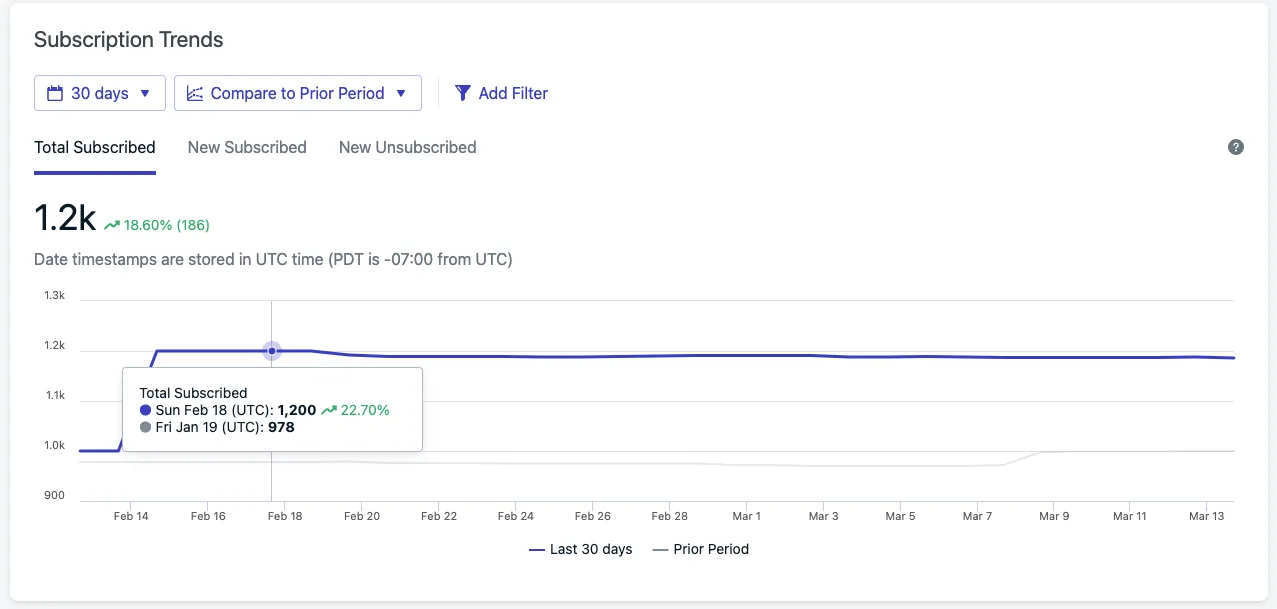
Subscription Trends Report Source: OneSignal documentation website
Subscription trends and global outcomes (conversion) charts are displayed on the reporting dashboard; however, customizations are unavailable.
Message delivery, push notifications, emails, in-app messages, and SMS statistics can be found in separate reports, which isn’t convenient if you want a bird’s eye view of your customer engagement efforts.
Pushwoosh, on the other hand, offers fully customizable reporting dashboards with any subscription, allowing you to grasp a bigger picture or zoom into individual segments’ and messages’ performance.
Ease of use
Registration with OneSignal is simple. You don’t need to talk to a sales representative to get your first impression. One can find the segmentation functionality on the left-side menu.
Over 170 G2 users have reported that the OneSignal platform is easy to use and intuitive. Users mentioned that it was easy to create customer segments and that they didn’t need to rely on development teams to implement the tool.
85+ G2 reviewers spoke favorably about OneSignal’s support team; some mentioned that the representatives were willing to go above and beyond to help with any issues.
OneSignal’s documentation is well-structured and written. It’s also regularly updated, making it a reliable self-help source.
Pricing
The growth plan starts at $9/month; however, this plan allows you to create only ten customer segments and run simple A/B tests.
The professional plan, which lets you create 20 audience segments and run more sophisticated tests, is $999/month.
Airship
As a well-established martech provider, Airship is mainly used by retail, telecom, and transportation enterprises. This customer engagement platform has advanced segmentation features; however, its pricing totals thousands of dollars a month.
| Pushwoosh | Airship | |
|---|---|---|
| Custom data integration options | ✔️ | ✔️ |
| Out-of-the-box data segmentation functionality | ✔️ | ✔️ |
| Custom customer segmentation | ✔️ | ✔️ |
| A/B/n testing | ✔️ | ✔️ |
| Personalization | ✔️ | ✔️ |
| Reachability check | ✔️ | ❌ |
| Built-in data privacy and compliance | ISO 27001, GDPR, OWASP | GDPR, CCPA, CPRA, CDPA |
| Data retention period | 1 year for event data | Real-time analytics is stored for 7 days Opt-in and opt-out data can be stored for up to 4 years |
| Actionable reporting dashboards | ✔️ | ✔️ |
| Ease of use | ✔️ | ✔️ |
| Pricing | Starts from $49/month | Undisclosed |
Custom data integration options
Airship allows you to inject customer data from any source you need.
You can integrate Airship with Acoustic, Adobe Analytics, Adobe Experience Cloud, Amazon Web Services, Amplitude, Google Analytics, Google Cloud Storage, mParticle, Twilio Segment, and other martech tools.
At the same time, you can upload your customer data in a CSV file.
Out-of-the-box data segmentation functionality
You can build customer segments and target users based on their behaviors captured through actions they’ve taken on any channel. You can enrich customer profiles with customer-level attributes. RFM segmentation is also available to Airship users.
Just like Pushwoosh, Airship offers the features you need to create precise segmentation campaigns that drive engagement.
Custom customer segmentation
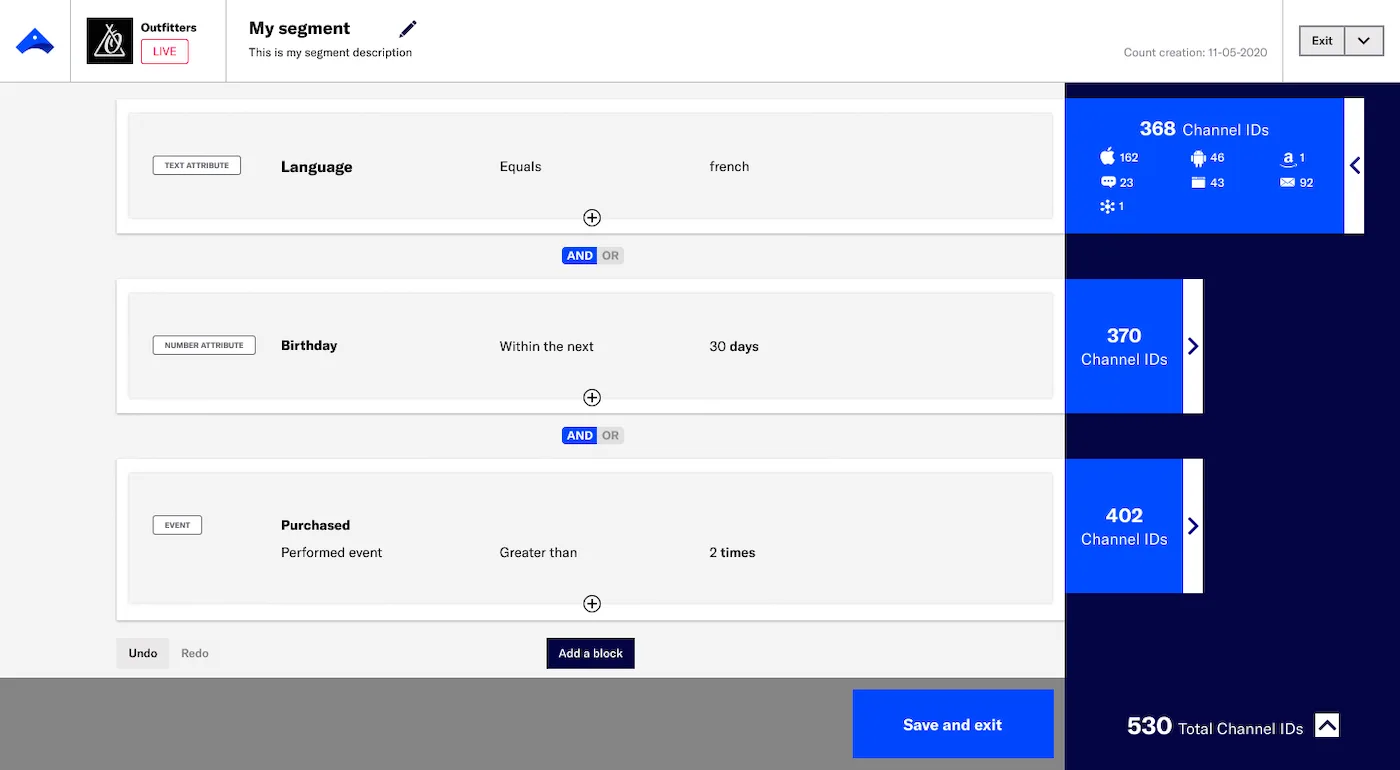
Audience counts in the segment builder Source: Airship documentation website
Mix and match user groups as you see fit with Airships’ reusable segments. You also have the option to include a saved segment in another one. The platform estimates the number of users in your segment, which gives you an approximation of the users you’re about to target.
You can get the exact same segmentation flexibility at a fraction of the cost at Pushwoosh.
A/B/n testing capabilities
Airship offers multivariate testing. You can run extensive experiments until you find the perfect message for your customer segment.
Personalization
Airship lets you leverage user data to write personalized messages. Like Pushwoosh, it lets you personalize copy based on attributes, behavior, and location.
Reachability check
Based on the information available online, Airship does not offer a reachability check, which is a feature you’d expect from a platform that serves enterprise-level customers.
Built-in data privacy and compliance
Airship supports your compliance needs, including the EU General Data Protection Regulation (GDPR) and the laws passed in various states in the US, including California (CCPA and CPRA), Virginia (CDPA), and Colorado (CDPA). Compliance with these regulations ensures that Airship protects your users’ privacy.
Data retention period
Airship stores basic recipient data, performance analytics, and message content for up to 13 months. However, the maximum data storage for real-time analytics is 7 days, which can be limiting for prompt re-engagement campaigns and paying customer retention.
At the very least, opt-in and opt-out data can be stored for up to 4 years, allowing you to stay in touch with your subscribers over time.
Actionable reporting dashboards
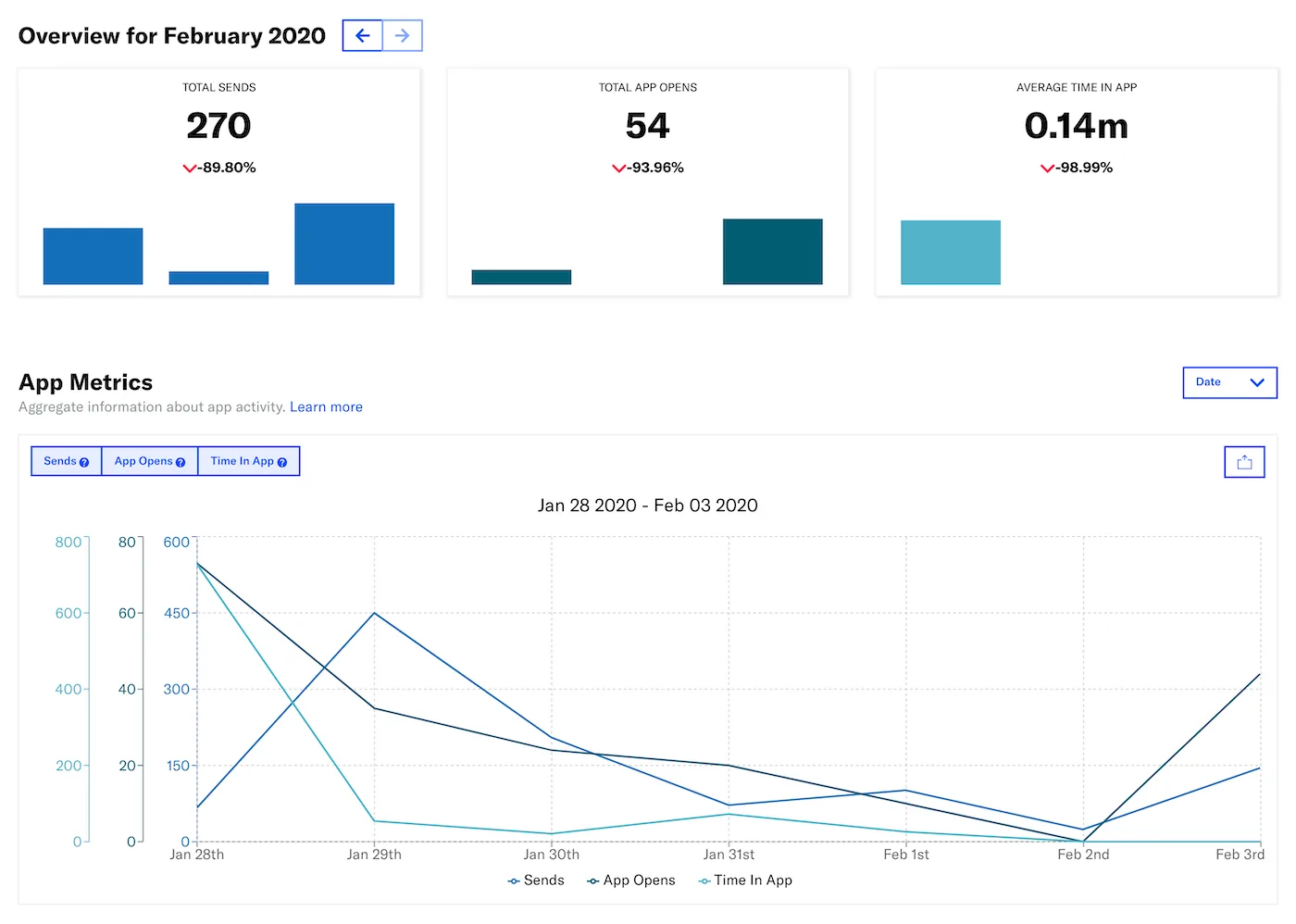
App metrics report Source: Airship documentation website
Users have been praising Airship’s analytics tools and reports. All the relevant data can be viewed in one central dashboard.
In addition to the classic DAU and MAU metrics, Airship tracks WAU (weekly active users) and allows you to set up custom reports and dashboards. You can create custom dashboards and track custom metrics with Pushwoosh, too.
Ease of use
Surprisingly, the registration process is simple for a provider that targets enterprise-level companies: you can use any email to get started with the tool.
The interface is intuitive but looks outdated. The segmentation functionality is available with a couple of clicks.
G2 users mention that there’s a lot of room for improvement in how fast the support team handles queries. One of the users mentioned that they’ve tried to fix an issue for three months.
Pricing
Client reports say pricing can reach up to $35,000 plus an onboarding fee. G2 users mention that priority support comes at an extra cost.
Analytics platforms that integrate with customer segmentation tools
If you already build segments in product analytics platforms, you can push them to your engagement tool to activate campaigns. These integrations make Pushwoosh a flexible customer segmentation online tool that connects to your existing analytics stack. Here are four powerful examples:
Amplitude — Identify at-risk groups (inactive 30+ days) in Amplitude, push segments to Pushwoosh, and trigger automated re-engagement campaigns with personalized push notifications.
⭐ Connect Amplitude with Pushwoosh
Mixpanel — Identify behavioral milestones (e.g., users completing Level 10 in a game), pass segments to Pushwoosh, and send contextual in-app messages.
💡 Connect Mixpanel with Pushwoosh
Twilio Segment — Unify customer data in Segment, then leverage user attributes in Pushwoosh to personalize push notifications, in-app messages, and emails.
👩💻 Connect Segment with Pushwoosh
mParticle — Transfer all mParticle audiences (based on attributes and events) to Pushwoosh as segments. When a segment updates in mParticle, it updates in Pushwoosh automatically.
🧑💻 Connect mParticle with Pushwoosh
How to effectively implement customer segmentation
Having the right tools is only half the equation. Here are the customer segmentation best practices and steps to customer segmentation that turn your investment into results:
1. Define clear objectives for each segment
Start with the business outcome: increase retention by 15%, boost repeat purchase rate, reduce churn among high-value users. Clear goals guide which segments to build and how to measure success.
2. Collect and unify customer data
Gather data from every relevant source — app events, website behavior, purchase history, CRM records, support interactions. Use integrations (like Pushwoosh’s connections with Segment, Amplitude, and mParticle) to unify this data in one platform. Fragmented data leads to incomplete segments.
3. Choose relevant segmentation criteria
Select the criteria that align with your objectives. Combine demographic, behavioral, geographic, and psychographic data points for richer segments. For mobile apps, behavioral criteria (events, session frequency, in-app purchases) typically deliver the highest impact. This is where customer segmentation and analysis tools provide the most value.
4. Create and refine your segments
Use your tool’s segmentation builder to apply criteria and generate initial segments. Review segment sizes — too broad means generic messaging; too narrow means limited reach. Iterate until you find the right balance.
5. Develop targeted strategies for each segment
Tailor messaging, offers, channels, and timing for each group. Pushwoosh’s Customer Journey Builder lets you design multi-step, multi-channel flows per segment — with dynamic content personalization and reachability checks built in.
6. Test, measure, and iterate
Launch A/B/n tests within each segment to optimize messaging. Monitor results through analytics dashboards. Refine segment definitions and strategies based on what the data tells you. Segmentation is not a one-time setup — it is an ongoing process of applying customer segmentation tools and techniques to improve results.
Segment smarter and drive revenue with Pushwoosh
Effective customer segmentation is not about creating groups for the sake of organizing data. It is about delivering the right message to the right person at the right moment — and turning that precision into engagement, retention, and revenue.
The right customer segmentation software makes this possible at scale. Pushwoosh combines advanced behavioral segmentation (tags, events, RFM), a visual Customer Journey Builder, cross-channel messaging (push, in-app, email, SMS), A/B/n testing, and AI-powered campaign optimization — all in one customer engagement platform.
Whether you are a startup exploring best free customer segmentation tools or an enterprise looking for a cost-effective alternative to platforms charging $60K+/year, Pushwoosh delivers the customer segmentation tools features you need to engage, retain, and earn more from every customer.
Sign up for free and start segmenting today.