
When you send an email or a push notification with a marketing offer, you most likely want to know for sure if it reaches your customer or not. And now Pushwoosh enables this! Check the channel reachability before sending your communications and make sure your customer misses none of your messages.
Learn how to go omnichannel with Pushwoosh and ensure maximum deliverability of your communications.
How you can benefit from using Reachability Check
Reachability check primarily serves one important need—enabling fully cross-channel communication. When you create a new campaign in Pushwoosh Customer Journey Builder, use the Reachability Check feature to cover customers who are unreachable via pushes or email through other channels. And get every single customer engaged!
🆕Keep your customers engaged at every stage of their journey — try some of our 22 ideas for customer engagement. We’re sharing them in a pocket guide for free!
For both push notifications and email, at the same time, you can check whether:
- A user has technical availability to receive emails or pushes
- Your target customer is opted-in to your push notifications or is even subscribed to emails
- The app is still installed on the user’s device
An extra advantage of cross-channel communication is that your message delivery statistics will be way more accurate as they will no longer count in opted-out and unsubscribed users.
Reachability check: Use cases and best practices
Check the reachability before sending your messages and combine various communication channels to cover all your customers, each one via the right channel.
Using email instead of pushes (And vice versa)
For example, you want to send a push notification telling about a new app version being released. Use Reachability Check and send an email to those who are technically inaccessible to push notifications or simply have push notifications on their devices turned off.
In-app messaging as an extra engaging channel
Another use case may be sending your marketing offer via push notifications and covering those who won’t receive pushes for some reason via in-app messages with the help of Reachability Check.
Multichecking all the available channels
You can also check if a user is reachable via both email and push notifications simultaneously. And if they’re not, that’s fine. Instead, send them an eye-catching in-app or WhatsApp message or SMS — depending on which one better suits your needs.
Wasn’t reachability check available before in Pushwoosh?
Actually, Pushwoosh Customer Journey Builder had a similar functionality before
but not as a dedicated feature. Checking reachability involved using
Segment Split—a great feature itself but not built for the purpose in question.
Now you can do
segmentation
in a click and send your marketing communications more precisely with the help
of Reachability Check.
How to use Reachability Check in Pushwoosh
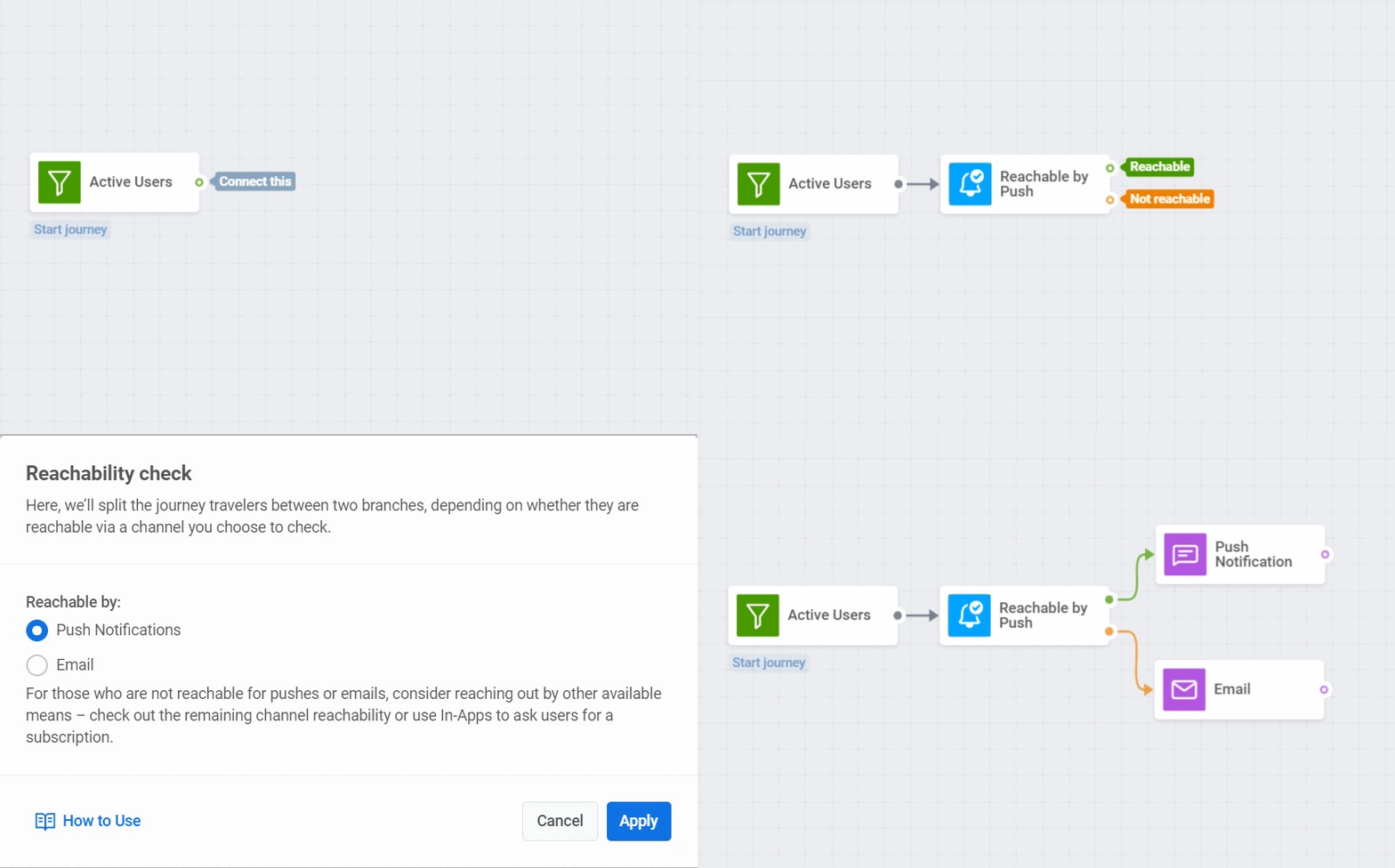
It’s easier than you could expect! While creating a sequence in Customer Journey Builder, take the following steps:
-
Create a segment of users whose reachability you’d like to check.
-
Follow up the specified segment with the Reachability Check element and choose the channel you’d like to check: push notifications or email.
-
After that, set the appropriate type of communications — reach out to users who are not subscribed to pushes with emails and vice versa, or send an in-app message to cover all of them.
Can’t wait to try out Reachability Check? Touch up your current Journeys right now to maximize the effectiveness of your marketing communications.
New to Pushwoosh? Explore all the features and use cases on a personal demo:


